Free options & stock trading journal
Options trading journal. Stock trading journal. One workspace.
An options trading journal and a stock trading journal. Use either independently or together — with assignments, covered calls, rolls, and wheel trades linked automatically. Unified P&L and portfolio allocation in one workspace.
Ledger-accurate · 100% free · no card
Core features
Built for how you actually trade
Options and stocks in one workspace — journaled, calculated, and analyzed.
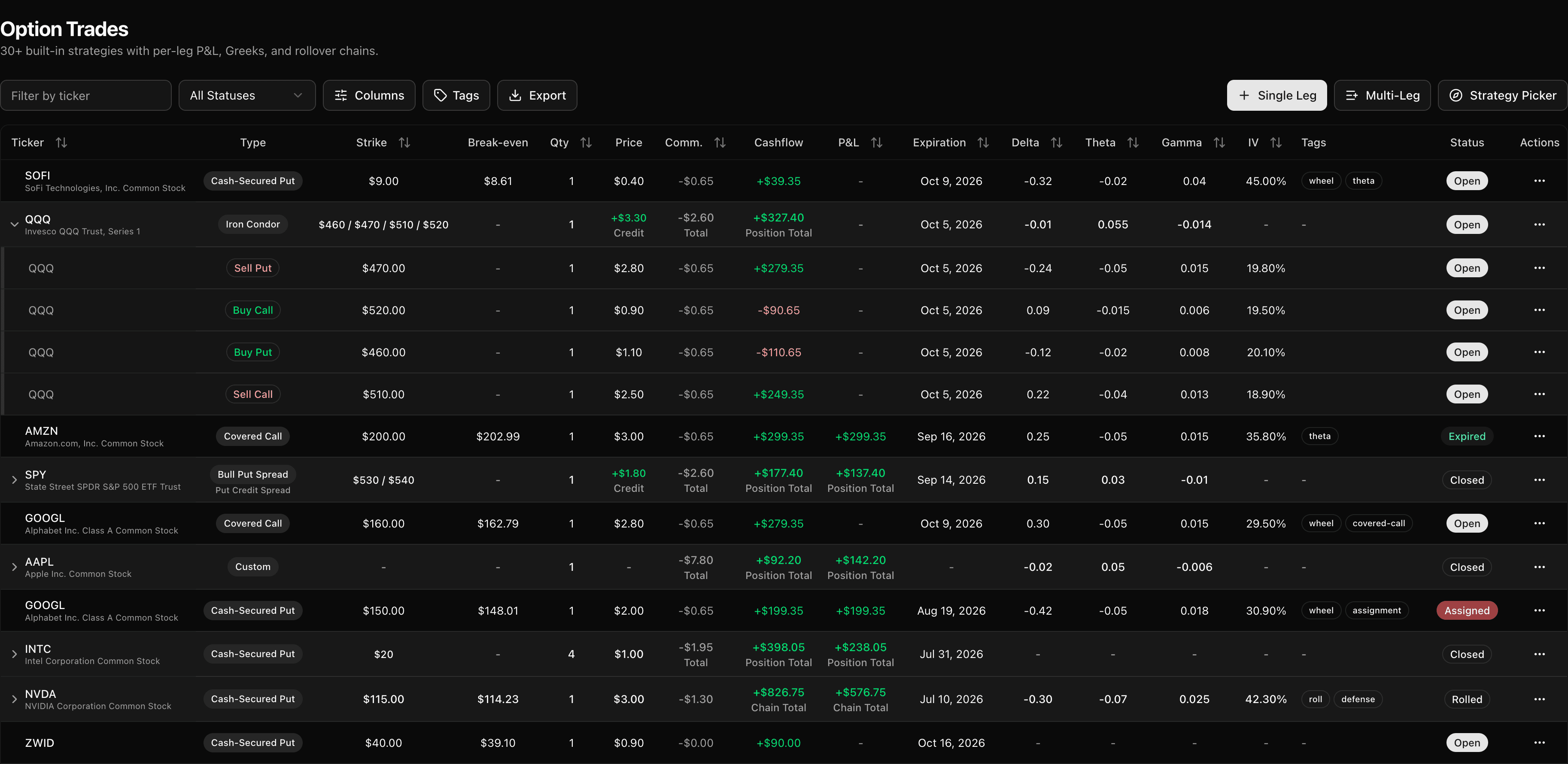
Options Trade Journal
30+ predefined strategies with rollover chains, Greeks & IV tracking, per-leg P&L, and ledger-accurate accounting.
Log single-leg trades in seconds or build multi-leg positions with automatic strategy detection.
- Strategy templates
- Auto-detected strategies
- Up to 8-leg positions
- Rollover chains
- Assignment & expiration
- Shares as collateral
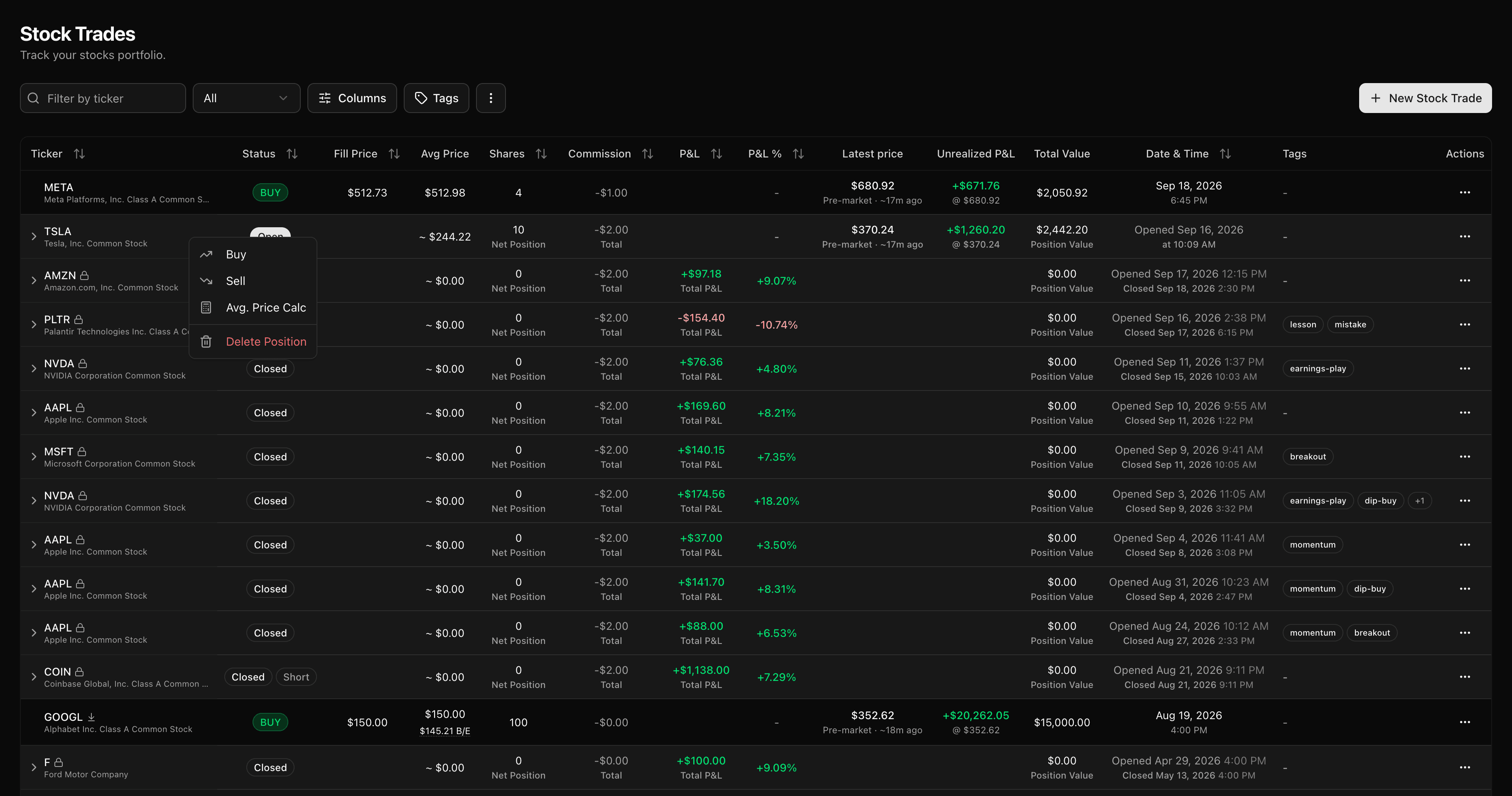
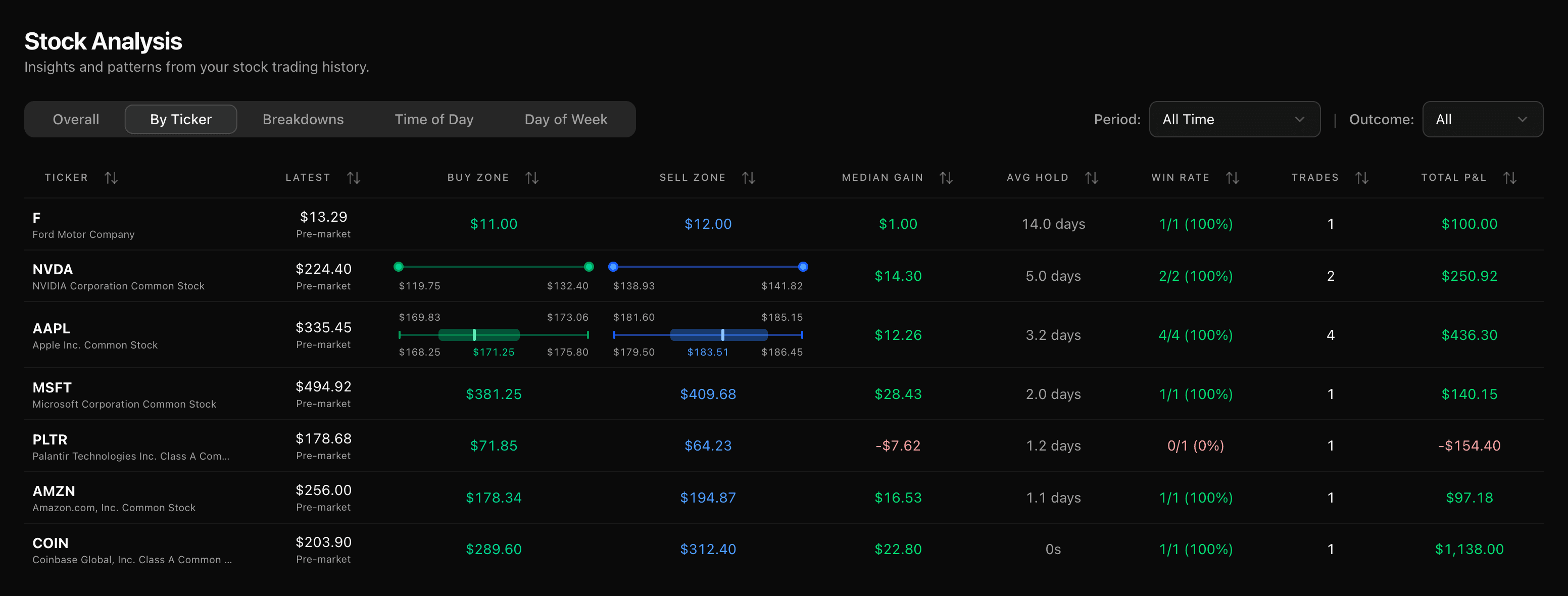
Stock Trade Journal
Track every buy and sell with position grouping and flexible cost basis — FIFO, LIFO, or average. Shares assigned from options land here automatically, ready to use as covered-call underlying.
- Position grouping
- Partial exits
- Fractional shares
- Assigned shares
- FIFO / LIFO / avg cost basis
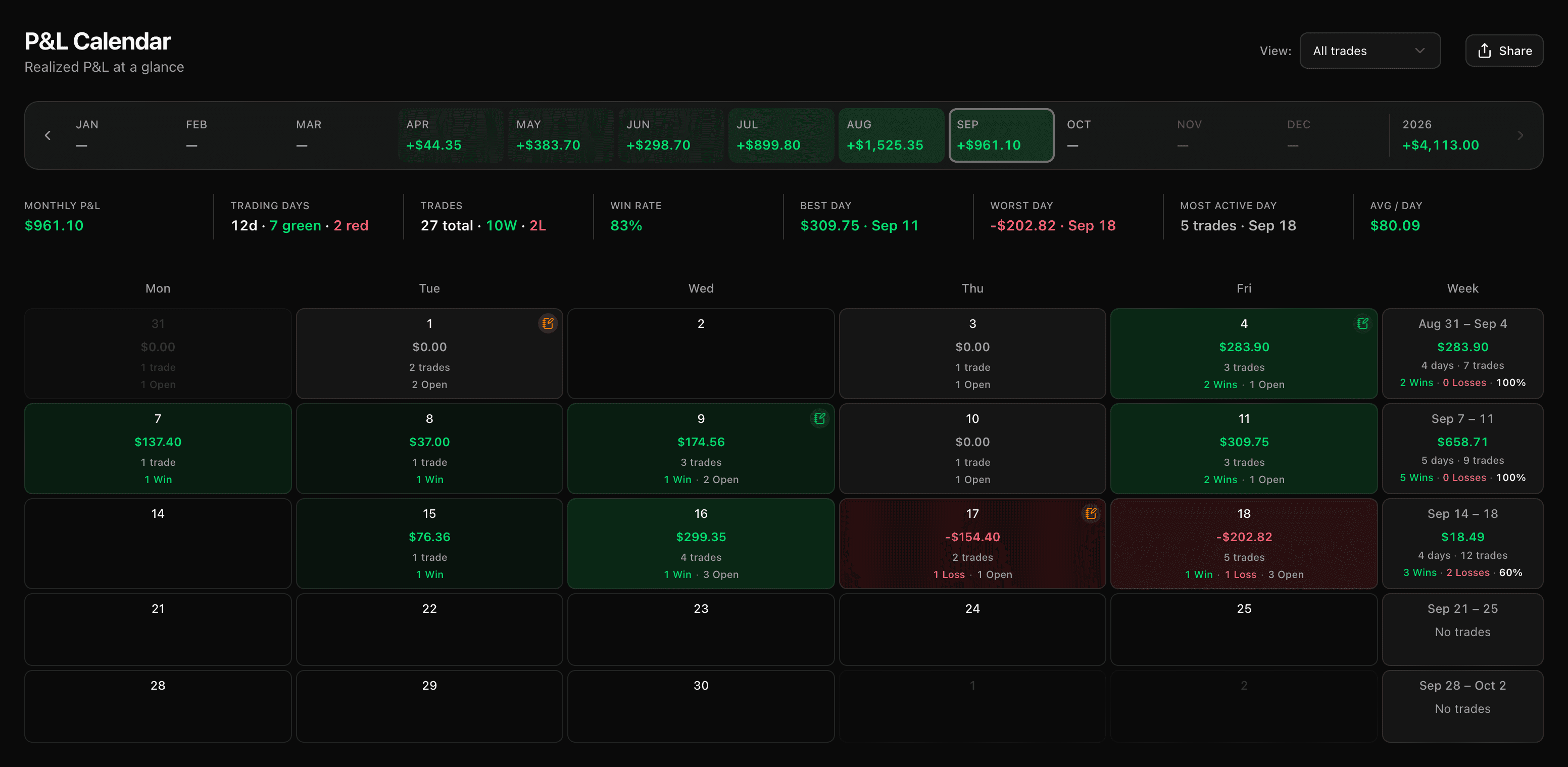
Shareable P&L Calendar
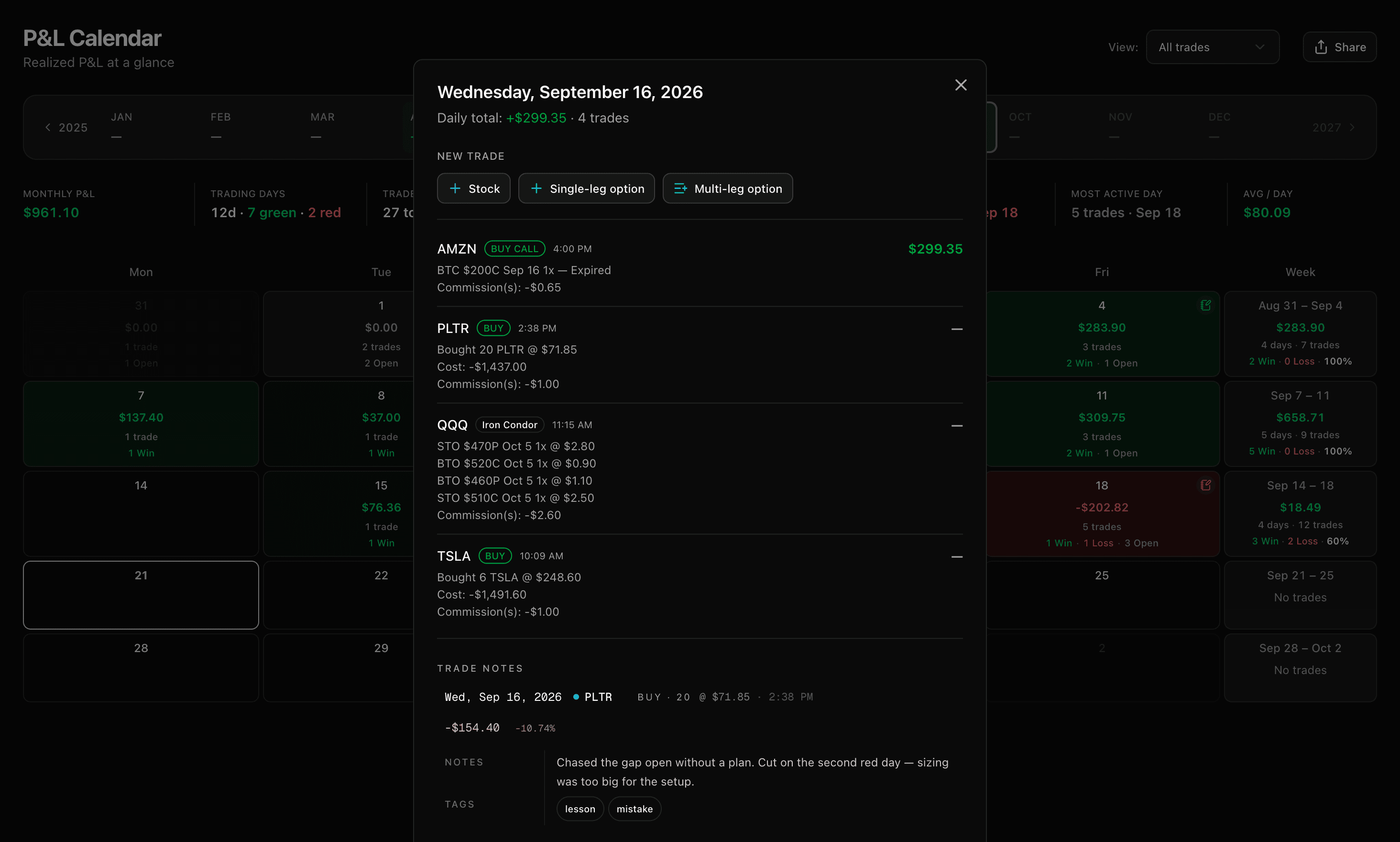
A 12-month strip, a color-coded daily heatmap, weekly totals, and per-day drill-down. Share any month as a public link — without exposing a single ticker, strike, or order.
- Daily heatmap
- Day drill-down
- Weekly totals
- Month at a glance
- Share in one click
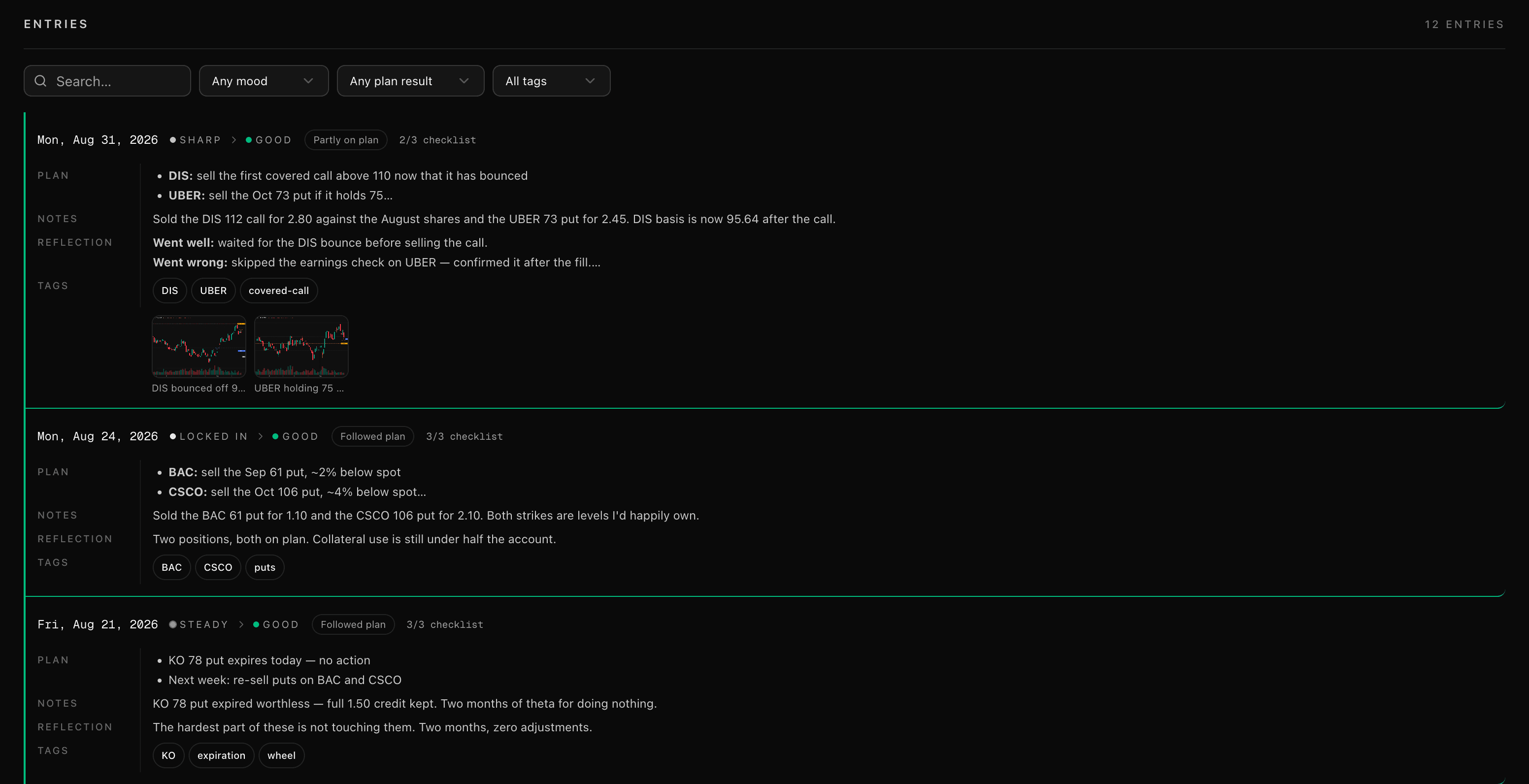
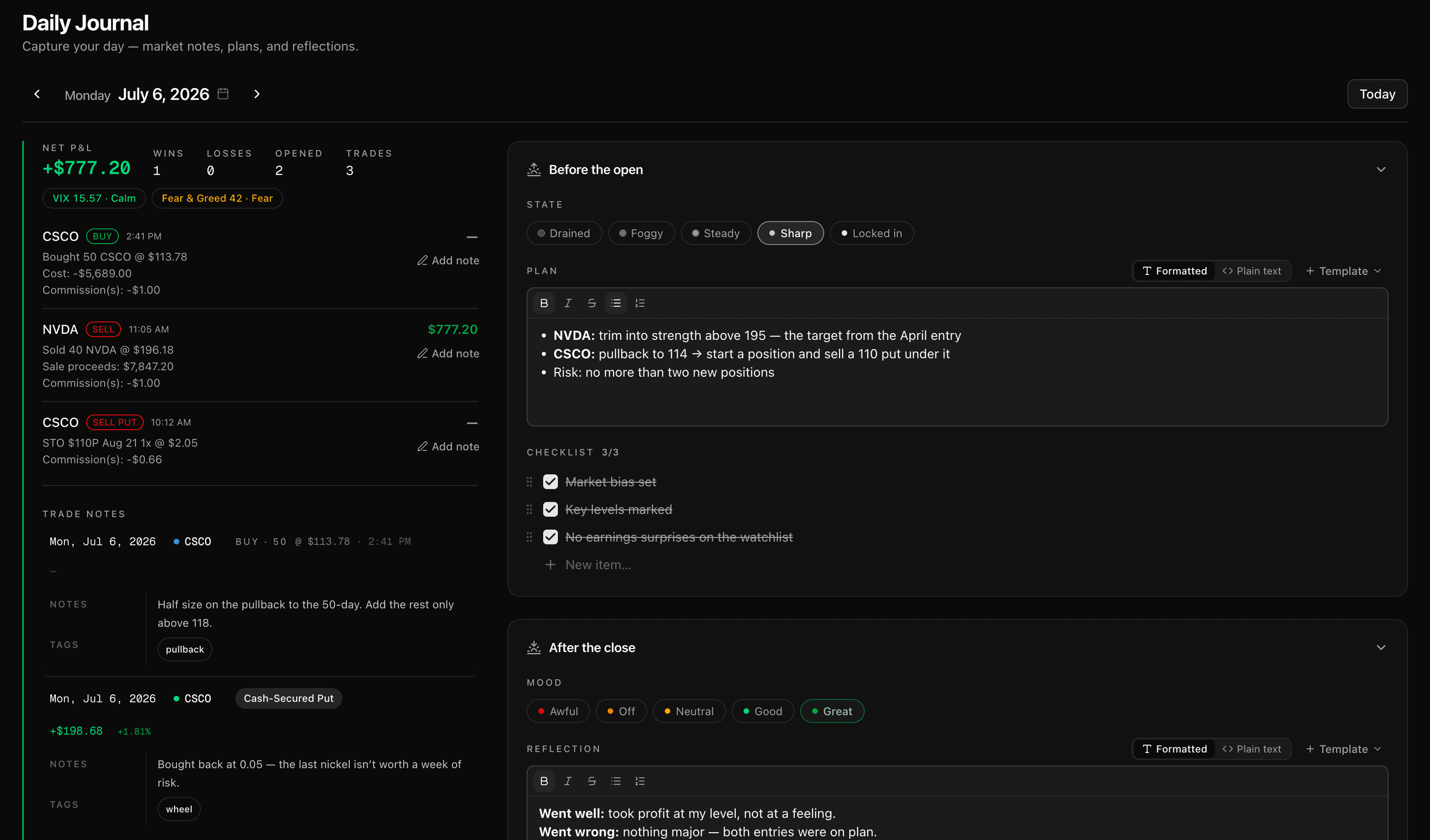
Daily Trading Journal
A structured entry for every trading day — your state, plan, and checklist before the open; your mood, reflection, and whether you followed the plan after the close. Pin up to five screenshots per entry and tag it to pull it back later.
Every entry is flagged on your P&L calendar, so the context sits right beside the result — what happened, and why.
- State, plan & checklist
- Mood & reflection
- Plan follow-through
- Tags & screenshots
- P&L patterns
- On your P&L calendar
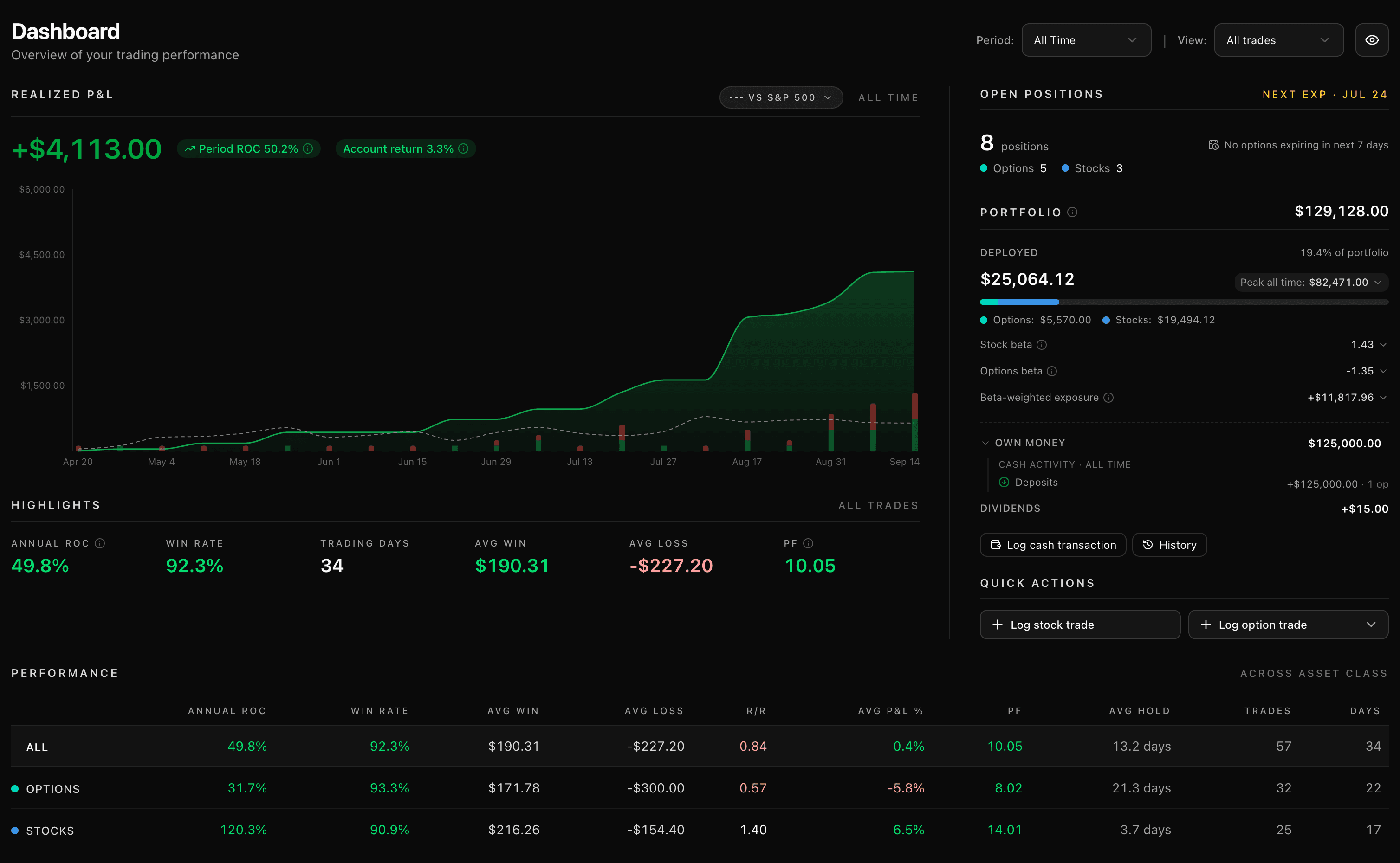
Performance Dashboard
KPIs, a cumulative P&L chart, capital deployed, win rate, profit factor, and average-trade metrics — options and stocks combined in one view.
- Cumulative P&L
- Open positions
- Expiring options
- Performance data
- Cash allocation
- Quick actions
// the-wheel
Two journals, one position
Most journals make you pick a side — options or stocks. TickerScribe tracks both and links them. Sell a cash-secured put; when it's assigned, the shares appear in your stock journal at the right cost basis. Sell a covered call against them; when they're called away, the sale closes the loop.
- 1Sell a cash-secured putOptions
- 2Assigned · 100 sharesStocks
- 3Sell a covered callOptions
- 4Called away · shares soldStocks
Linked as one wheel cycle · on a single ledger
// the-complete-toolkit
Every detail, tracked
Options, stocks, and the analytics that tie them together — use what you need, ignore the rest.
- 30+ strategiesauto-detected
- Up to 8-leg positions
- Rollover chains
- Partial closes
- DTE + Days Left
- Greeks & IVopen + close
- FIFO / LIFO / averagecost basis
- Short sellingoff by default
- Stop loss & take profit
- Position grouping
- Assignment & call-awayshare handoff
- Fractional shares
- Performance dashboard
- Portfolio betastocks + options
- P&L calendarshareable
- R multiples
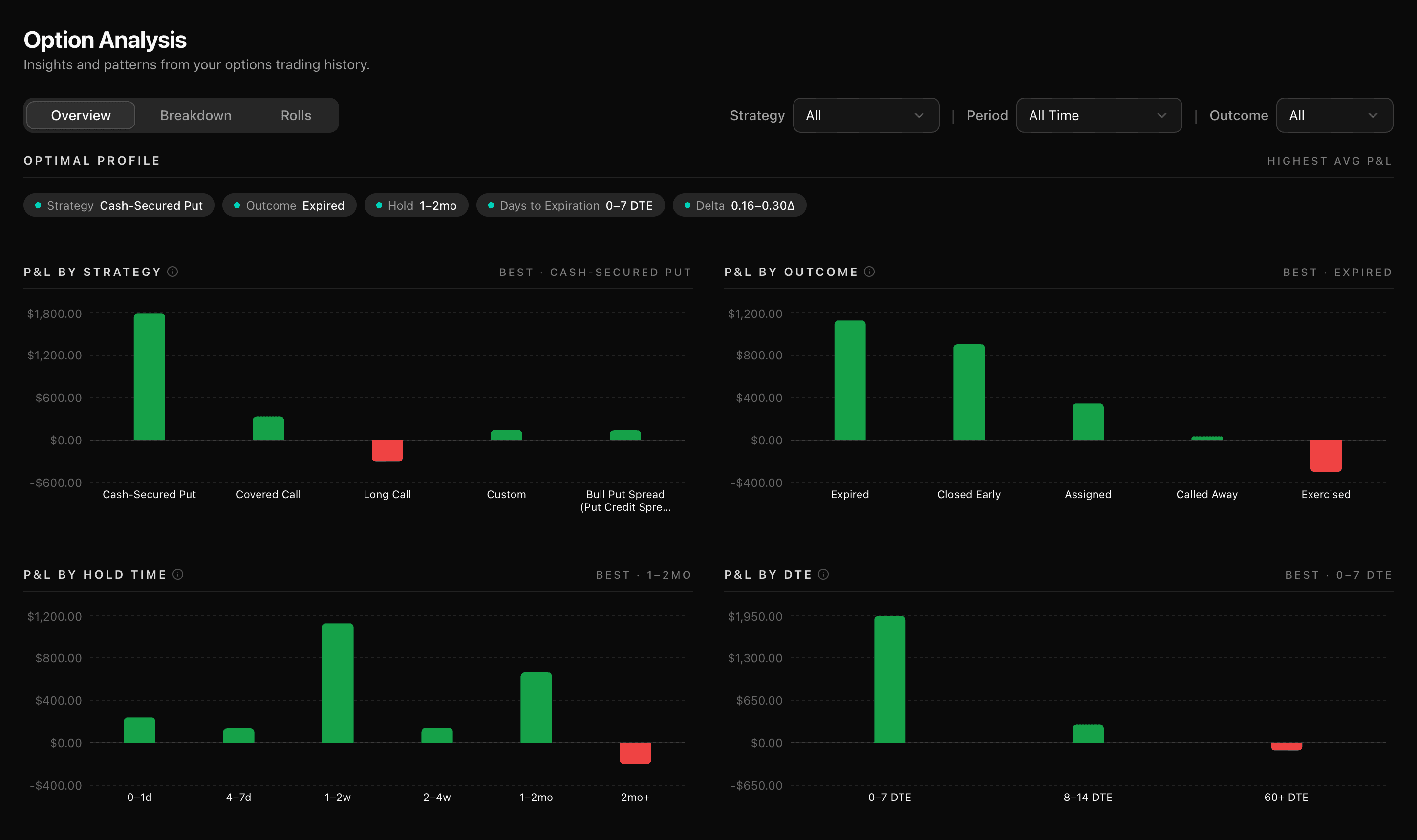
- Trade analysis
- Performance by ticker
- Up to 3 accounts
- All-accounts overviewnever converted
- Per-account currency
- Cash transactionsin / out
- CSV import & exportbackup
- Customizable settings
P&L that balances to the cent
Every trade posts to a double-entry ledger inside a transactional database. Your P&L is derived from entries that must balance — not pieced together from spreadsheet formulas.
Premiums, commissions, and assignments each get their own entry. Roll an option and the chain links automatically. Get assigned, and the shares flow straight into your stock journal — every leg accounted for.
- Sell to openAAPL 165P · 1 contract+240.00
- Commissionopen + close−1.05
- Assignment100 sh @ 165.00−16,500.00
- Stock sold100 sh @ 171.00+17,100.00
every entry balances · accurate to the cent
// bring-your-trades
Bring your existing trade history
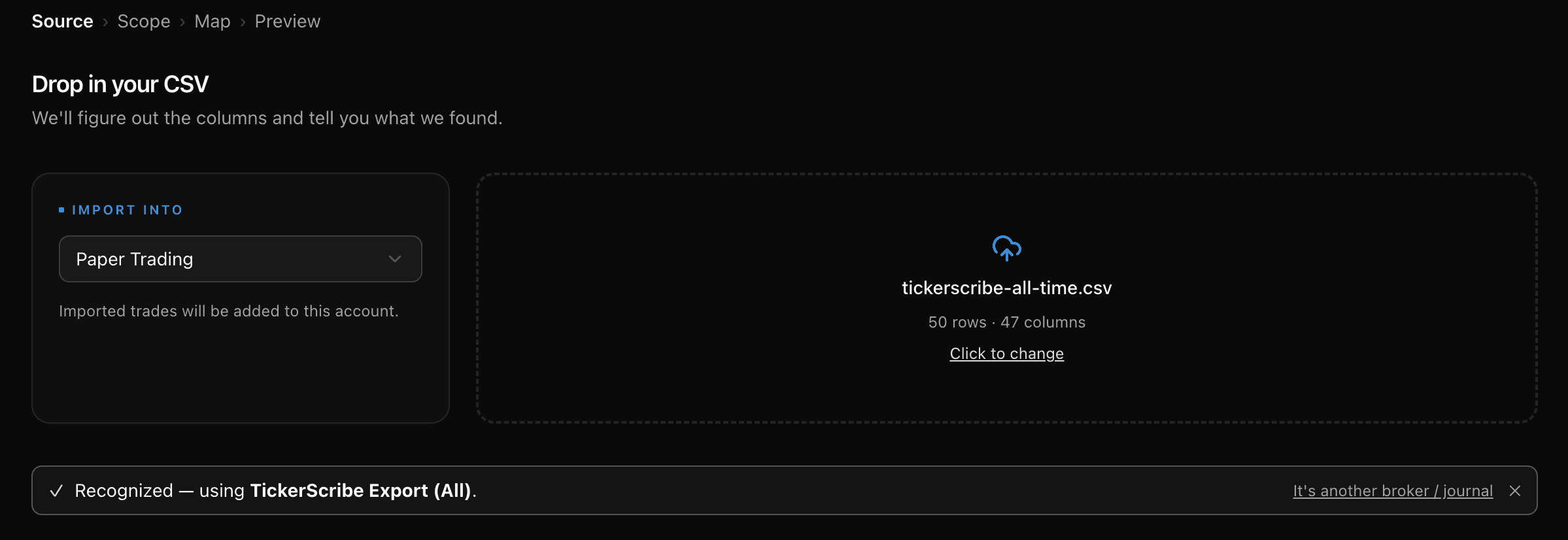
No retyping. Major brokers are auto-detected on upload; every other broker and journal imports through the universal CSV mapper — columns auto-suggested, mapped in a minute.
Drop the file as-is — TickerScribe recognizes the layout and maps every column for you.
Export a CSV from anywhere and map your columns once — TickerScribe auto-suggests the matches, so it takes a minute, not an afternoon.
// data-portability
Your data is yours
Every export is a 100% backup. Re-import it anytime — full restoration of your portfolio, exactly as you left it. Plain CSV, no lock-in.
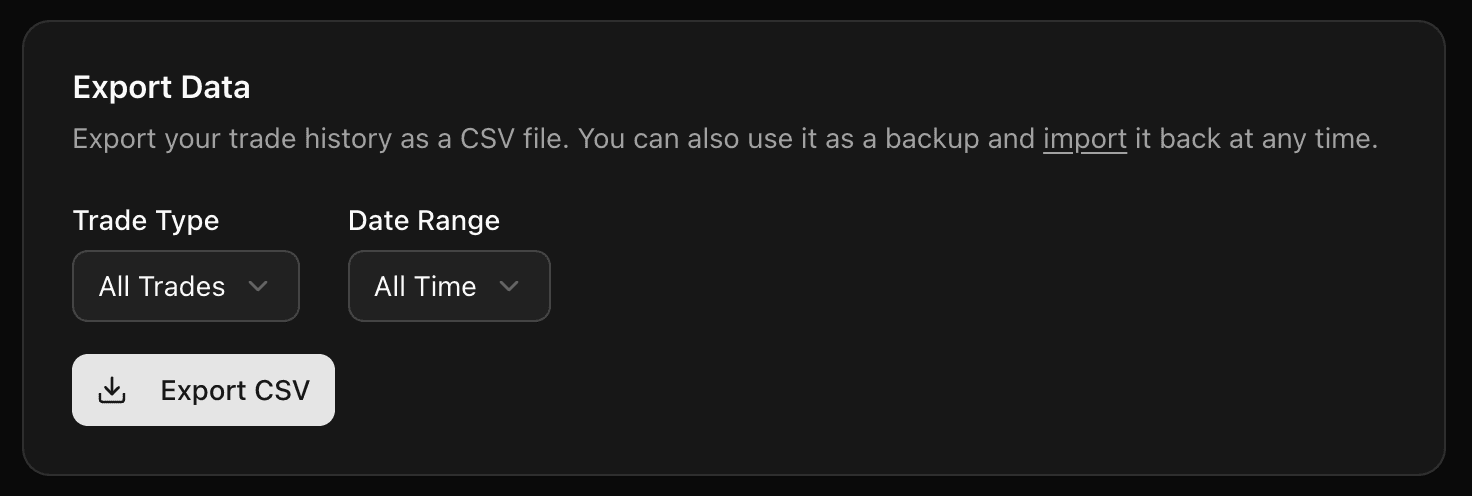
Source,Ticker,Type,Date,Strike,Expiration,Contracts,Premium/Contract,Status,Close Price,Realized P&L,…Option,AAPL,Sell Put,2026-04-29 13:00,165,2026-05-16,1,2.40,closed,0.15,+225.00,…Stock,AAPL,Buy,2026-04-10 10:12,,,,,,,,…Cash,,Deposit,2026-04-23,,,,,,,+5000.00,…… every trade, every leg, every cash entry
Frequently Asked Questions
Is TickerScribe really free?
Will TickerScribe always be free?
How does TickerScribe calculate P&L?
How is this different from tracking trades in a spreadsheet?
Can I import my existing trades?
Can TickerScribe track option rollovers?
What option strategies does TickerScribe support?
What option Greeks does TickerScribe track?
Can I use TickerScribe for stock trading only?
Can I use TickerScribe for options trading only?
Can I share my P&L calendar publicly?
Can I track multiple portfolios or brokerage accounts?
Is my trading data private?
Open your journal
Ready to track smarter?
No credit card required. Start journaling your trades in under a minute.