Changelog · 17 updates

What's New

Features, improvements, and fixes shipped to TickerScribe.

Latest
Feature

Dashboard 2.5 — Portfolio, Cash, and What's Expiring

Portfolio with own money and cash history, expiring flagged on Open Positions, multi-leg detail inline, and Hide Amounts for screen shares.

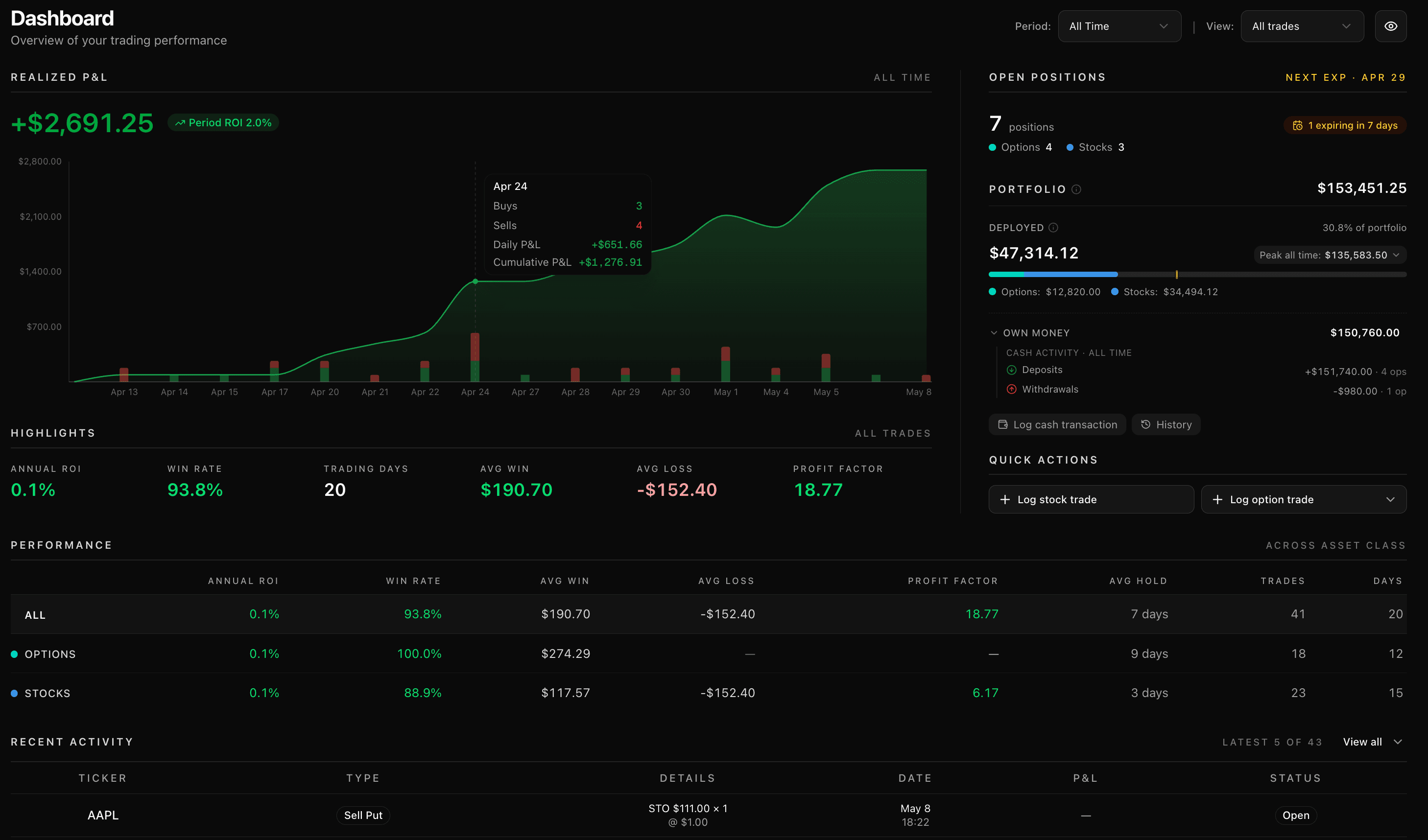
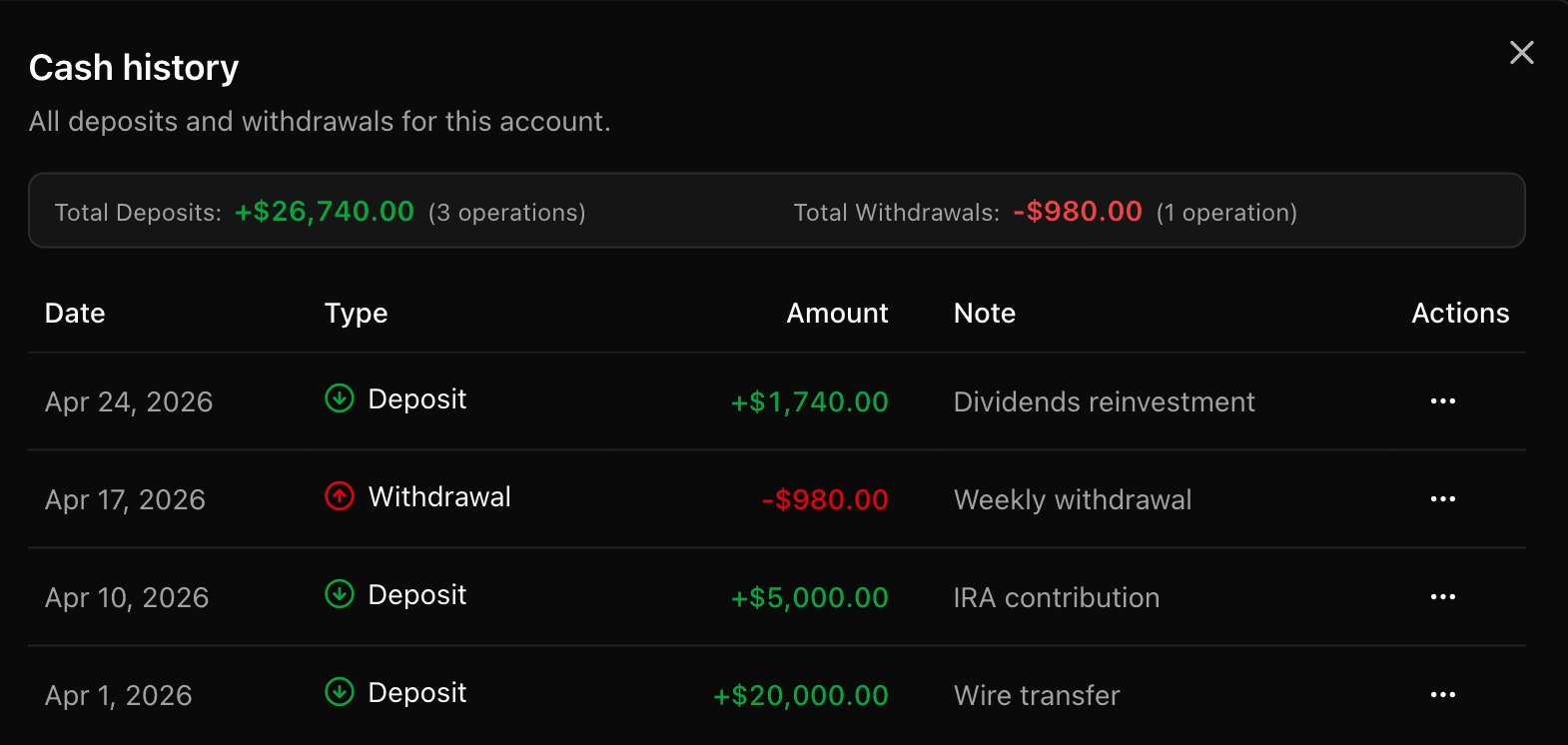
The Portfolio tile is now the headline — and it finally shows you what's yours versus what you've made. Your total breaks down into own money (every deposit and withdrawal you've logged) plus realized P&L, so you see growth separate from capital. A second row, Deployed, shows how much is tied up right now versus your peak usage, split by stocks and options. Log deposits and withdrawals right from the tile, or tap History to see the full ledger with dates, amounts, and notes.

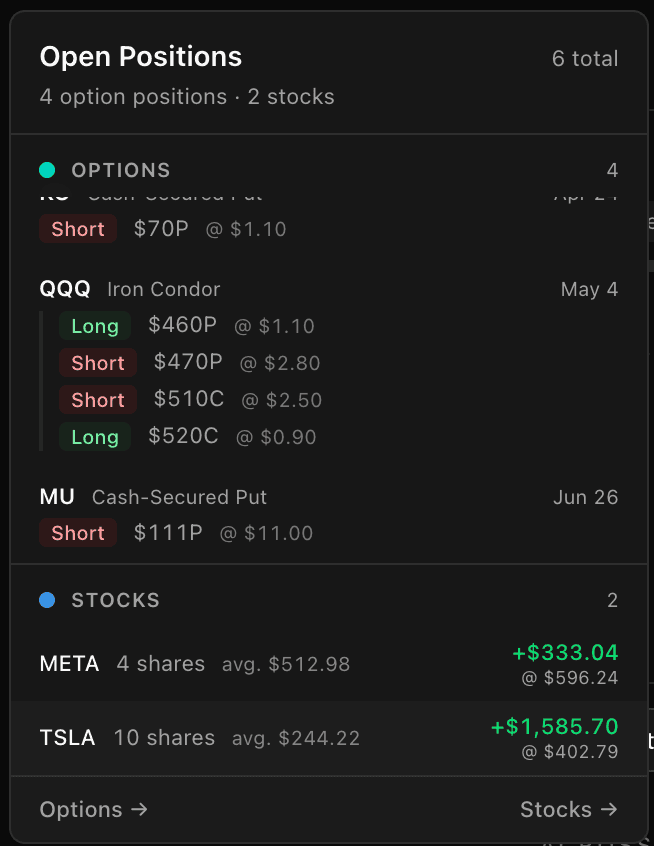
Open Positions leads with what matters most — expiring contracts. A Next Expiry date sits in the header so you never miss a window, and an amber badge flags anything expiring within 7 days. Every leg shows up clearly: side, strike, premium, expiration. Iron Condors, Spreads, Strangles, Covered Calls — they're all readable inline without jumping to a separate view.

Performance got rebuilt to answer the question that matters. A new metrics row shows your Annual ROI, Win Rate, Avg Win, Avg Loss, Profit Factor, Avg Hold, Trade Count, and Days Active — broken out across All, Options, and Stocks side by side so you see at a glance where your returns come from and where they don't. And when you're showing someone your screen? Click the eye icon to hide every amount as asterisks while keeping percentages, ratios, and counts visible. Share the shape of your trading, not the numbers.

Dashboard 2.5 with Portfolio tile showing Own Money and Cash Activity, Open Positions with expiring badge and multi-leg detail, and a Performance breakdown across asset classes
Filter
Feature

P&L Calendar 2.0 — Year Overview, New Metrics & Public Sharing

A 12-month year strip, eight monthly metrics, and shareable monthly snapshots with optional amount masking.

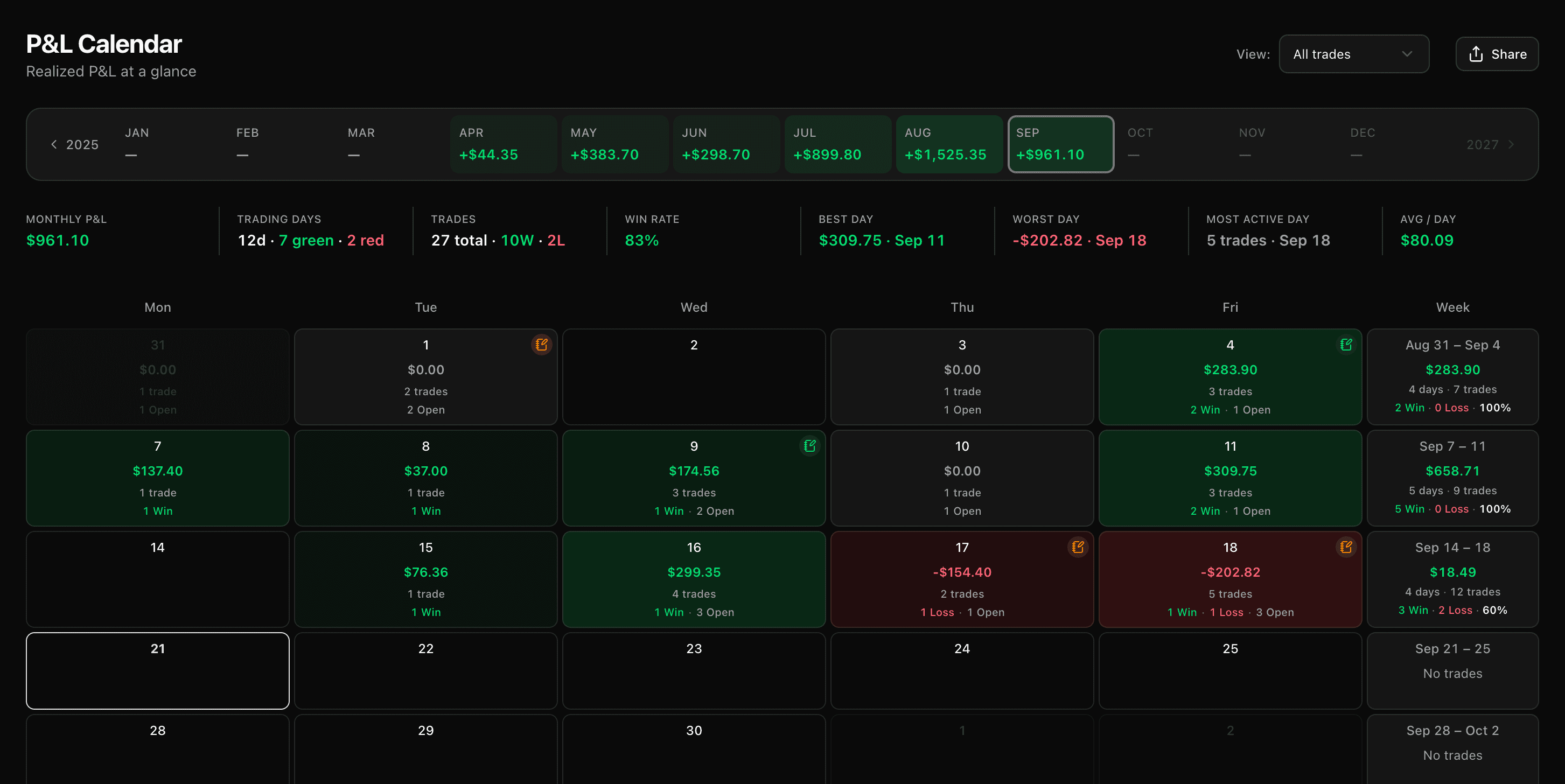
Your trading year now reads at a glance. A 12-month strip up top tints each month by its net P&L — green stretches, red drawdowns, the months you sat out — so the shape of the year shows up the moment you open the calendar. Tap any month to jump straight there, or scrub forward and back through your full history one year at a time.

Above the heatmap, eight monthly metrics that actually answer questions: total P&L, best day, worst day, most active day, average daily P&L, win rate, and the green/red split of trading days. Flip between All, Stocks, and Options at the top and the whole page repaints to match — heatmap, weekly summaries, and metrics all stay in sync.

And every month is shareable now. Hit Share, preview the page, and publish a public read-only link — with polished social-image previews when posted to X, Reddit, Facebook, or Telegram. Want to share the shape without the size? Flip Hide amounts and every figure renders as ••• while the colors and counts stay intact. Settings → Shared calendars lists every link you've ever published with its current view count, and one click takes any of them offline immediately.

P&L calendar with 12-month year strip, eight monthly metric tiles, daily heatmap, and weekly summaries
Feature

In-App Notifications — Updates, Reactions & Feature Requests

See what just shipped, tell us what you think with one click, and suggest what's next — without leaving the app.

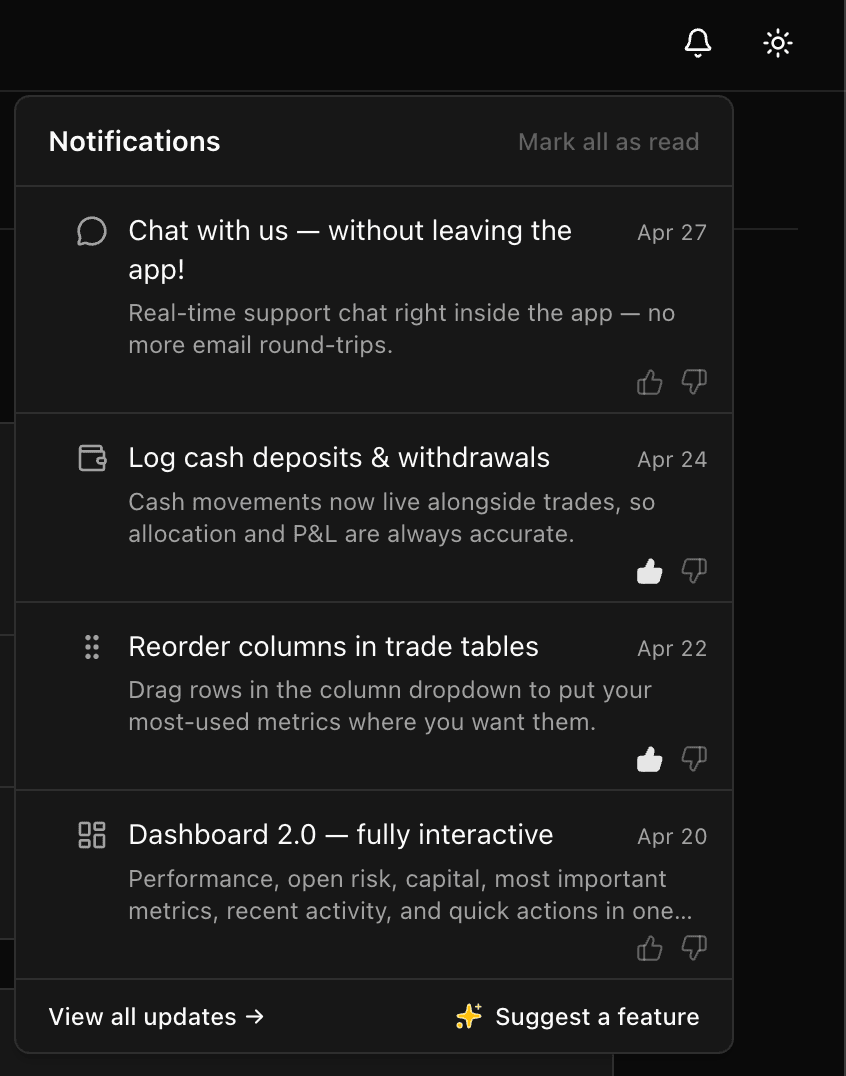
We ship a lot, and we want you to actually see it. Open the notifications drawer from the sidebar to scroll through the latest features, improvements, and fixes — straight from the app, no newsletter to dig through, no separate page to remember to visit. New updates highlight themselves with a small dot on the bell icon, so you'll know when there's something fresh.

Every update has reactions — drop a thumbs-up if you love it, a thumbs-down if it missed the mark, or anything in between. We read all of it. There's also a Suggest a Feature button right there: one click, type what you need, and we'll see it the moment you hit send. It lands directly in front of us and carries real weight when we decide what's next.

In-app notifications drawer showing recent product updates with reaction buttons and a Suggest a Feature action
Feature

Chat With Us — Without Leaving the App

Real-time support drawer right inside the app — no email round-trips.

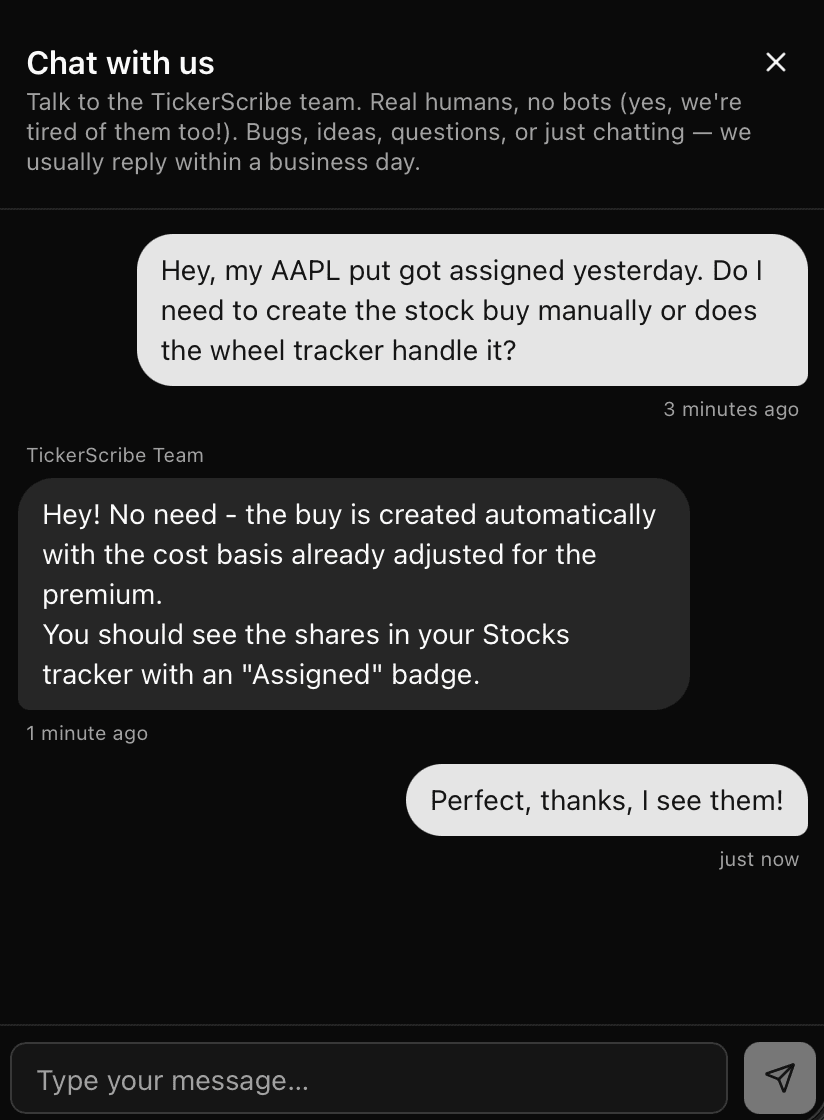
We get it — email isn't always the best move for a quick "is this a bug or am I doing this wrong?" question. So we built chat right into the app. Open the drawer from the sidebar, type your message, and we'll get back to you in real time.

Real humans on the other end (yes, we're tired of bots too). Bug reports, feature requests, weird edge cases, sanity checks — anything goes. A small red dot on the chat icon lets you know when there's a reply waiting, so you don't have to keep checking.

In-app support chat drawer showing a conversation with the TickerScribe team
Feature

Log Cash Deposits & Withdrawals

Cash movements now live alongside trades — no more drifting allocation %.

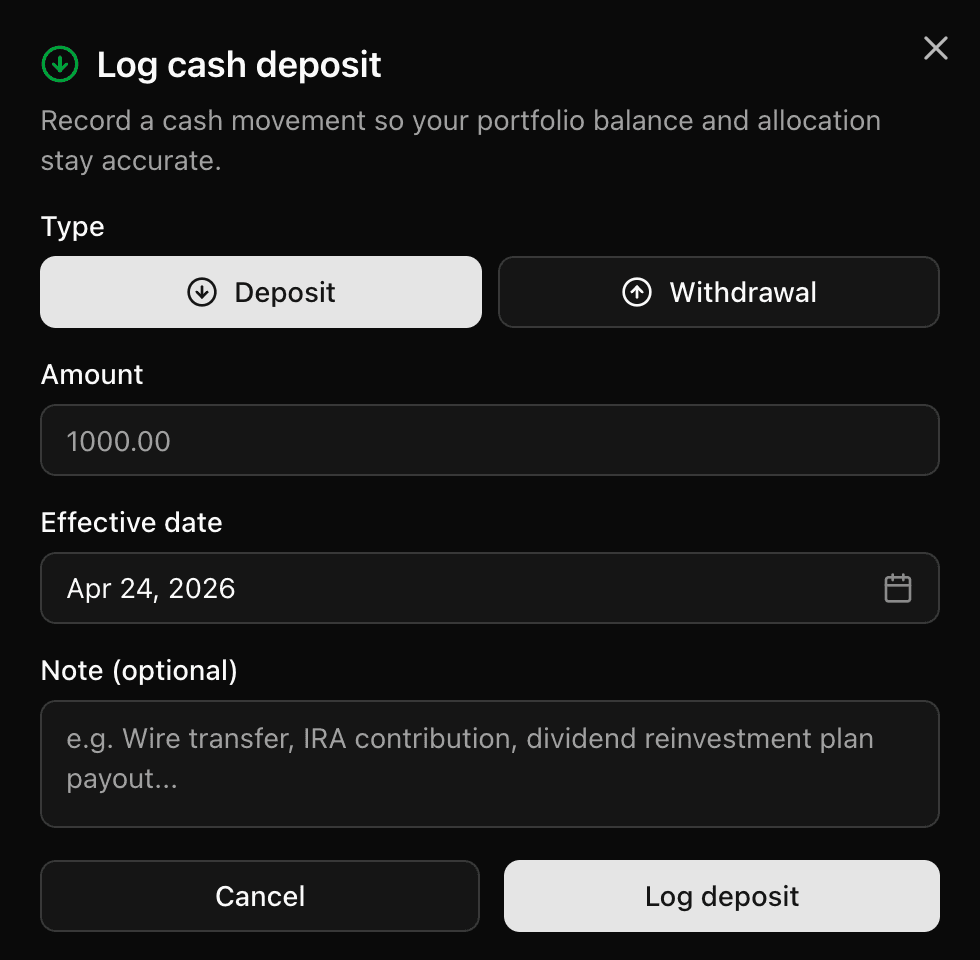
You can now log cash movements — every deposit and withdrawal is recorded alongside your trades so your portfolio balance stays accurate without manual edits. No more guessing at a number and watching allocation % drift when you top up or pull cash out.

Add a transaction from the dashboard's Quick Actions or from Settings → Manage cash. Backdating is supported, so you can catch up on past deposits any time. Edit or delete entries later without affecting your P&L math — trade-derived ledger entries stay immutable.

Log cash deposit or withdrawal dialog with amount, date, and note
Log a deposit or withdrawal from Quick Actions — with backdating and optional notes.
Cash history dialog showing total deposits, total withdrawals, and ledger of past entries
Full history with totals and entry counts — edits only affect your cash balance, never your P&L numbers.
Improvement

Reorder columns in trade tables

Drag rows in the column dropdown to put your most-used metrics where you want them.

Feature

Dashboard 2.0 — Fully Interactive

Performance, open risk, capital, recent activity, and quick actions in one place.

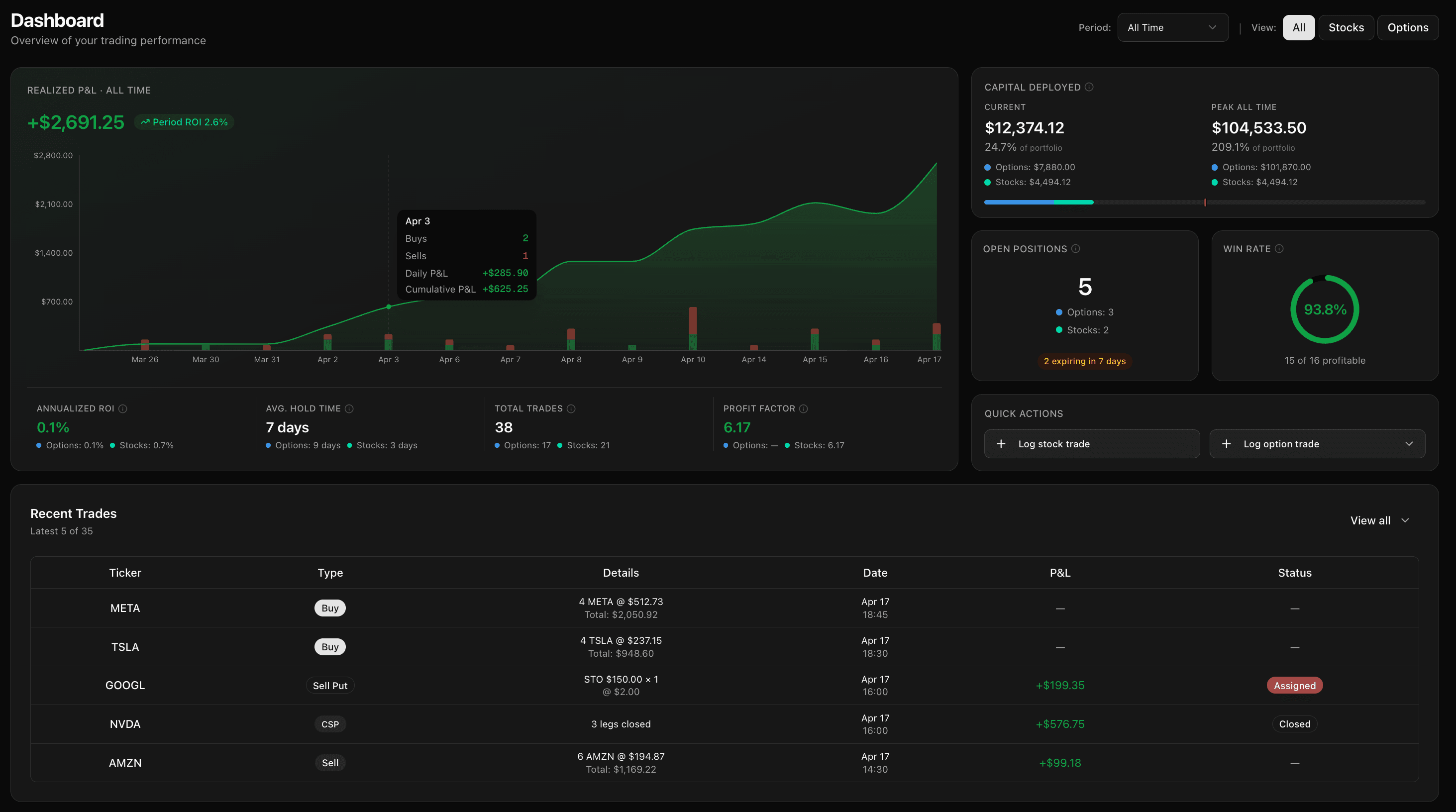
Dashboard 2.0 brings performance, open risk, capital usage, recent activity, and quick actions into one place. Switch between All, Stocks, and Options, change the time period, and get the full picture without bouncing across the app.

When you want detail, the dashboard opens it up. On desktop, click a day on the P&L chart to inspect the activity behind it. Open Positions shows active option positions with strategy labels, strikes, and expirations, plus stock lots that are still open. Win Rate breaks out options and stocks so you can see where the results come from.

It also shortens the path from review to action. Log a stock trade, single-leg option, multi-leg position, or start from Strategy Picker without leaving the page. Capital Deployed shows current vs. peak usage and asset split, and it can track portfolio thresholds when you set a portfolio balance. Expiring options are surfaced directly inside Open Positions.

Dashboard 2.0 showing performance, capital deployed, open positions, recent trades, and quick actions
Fix

Tooltip alignment on Open Positions hover

Tooltip now stays inside the viewport when hovering rows near the right edge.

Feature

Multi-Account Support

Up to three fully isolated accounts under one login.

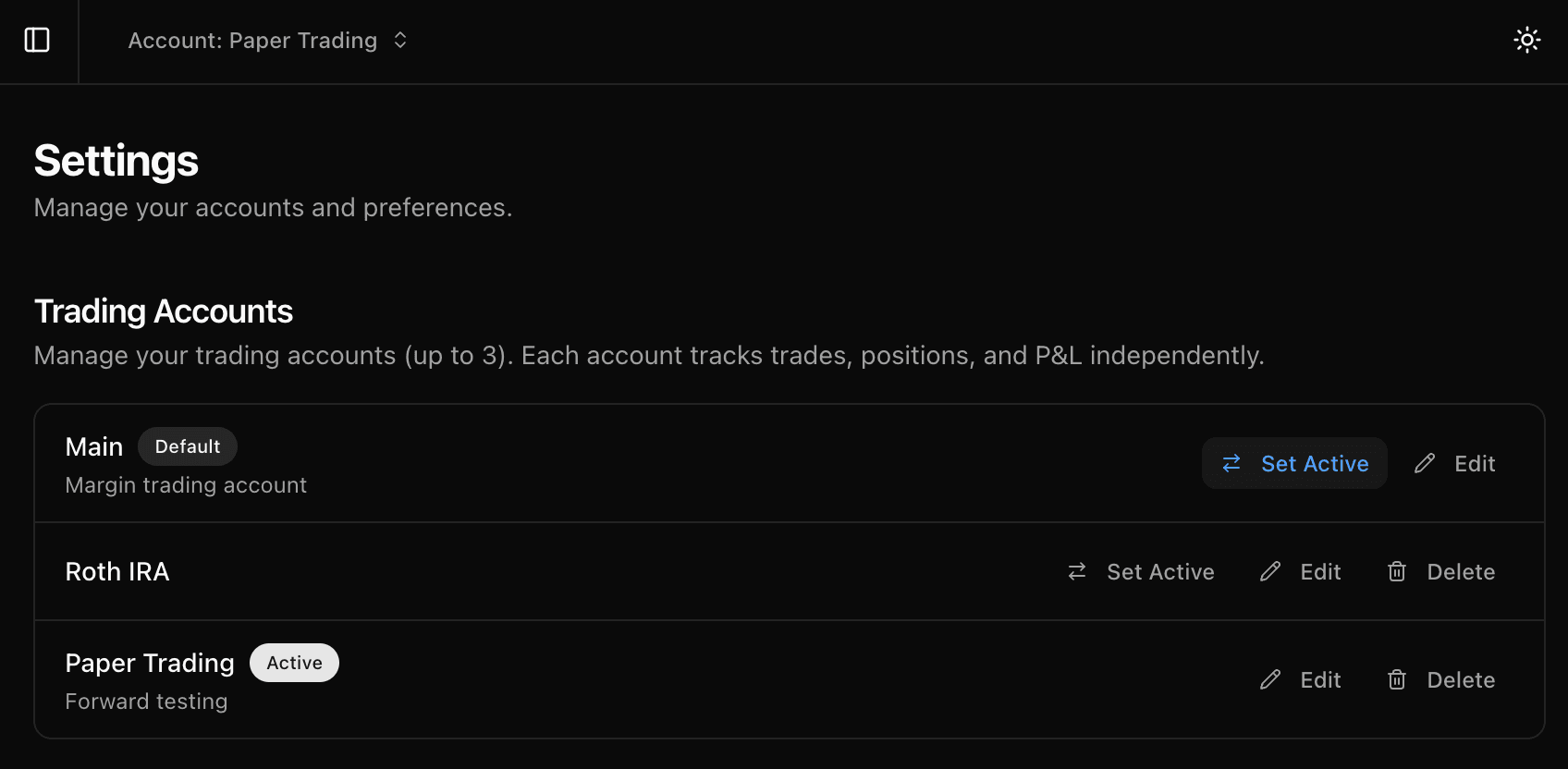
Track a paper-trading account alongside your real one. Run USD and EUR portfolios side by side. Separate Roth IRA from your taxable brokerage. Up to three accounts under one login, each with its own trades, P&L, calendar, and dashboard — completely isolated.

Switch accounts from the header in one click. Currency, cost basis method, portfolio balance, position locking — everything is per-account, so each portfolio works fully independently, exactly the way you need it to.

Account switcher in the header and trading accounts management in Settings
Feature

Strategy Picker with Payoff Diagrams

Visual overview of every structure with payoff diagrams and outlook filters.

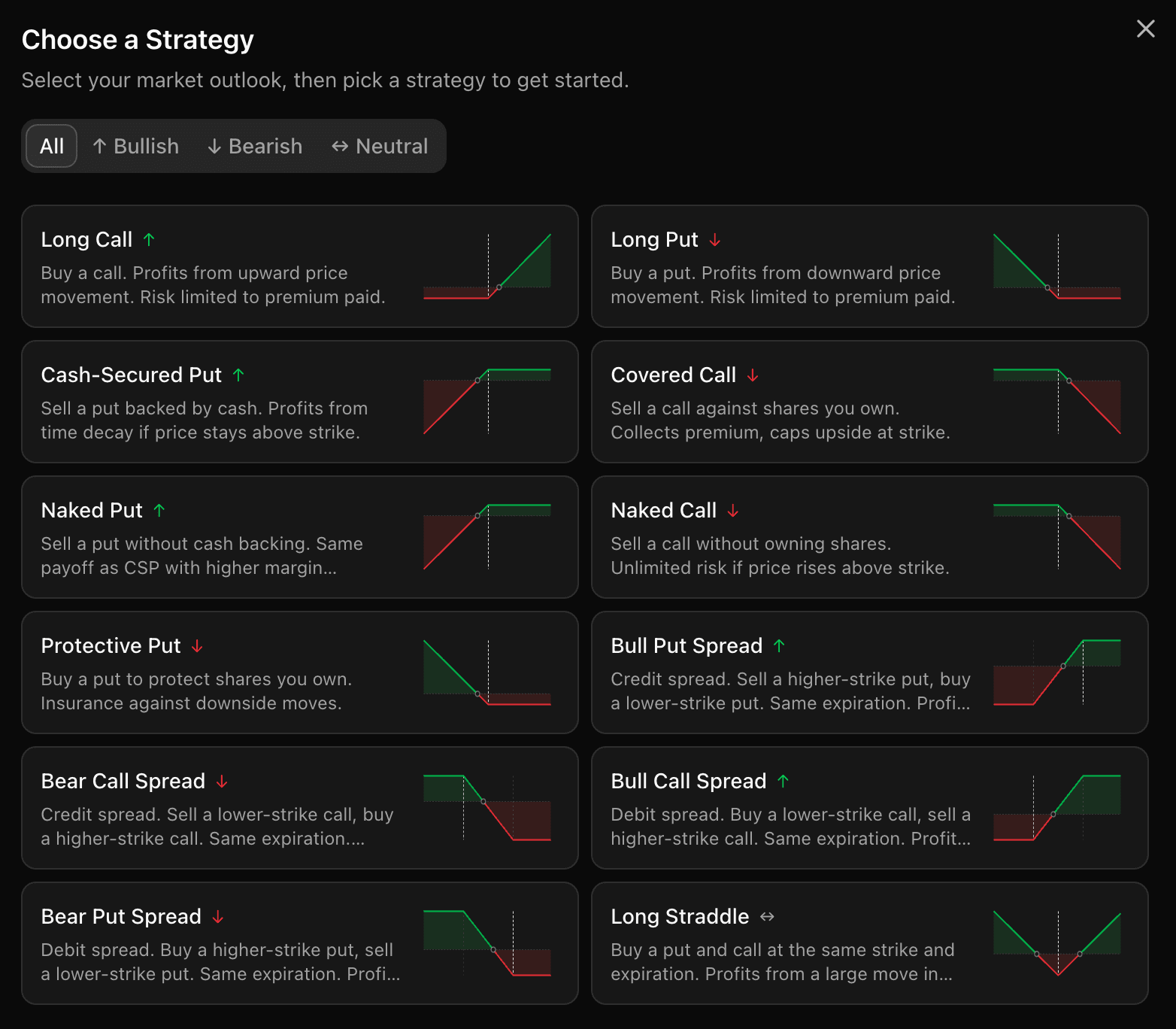
A new strategy picker gives you a visual overview of every available structure before you commit. Filter by market outlook — bullish, bearish, or neutral — and each card shows the strategy name, direction arrow, a short explanation, and a payoff diagram so you can confirm the risk profile at a glance.

Pick any strategy to jump straight into the multi-leg form with the right template loaded — legs, types, and sync rules pre-filled. No manual setup, no guesswork.

Choose a Strategy dialog with payoff diagrams, direction labels, and market outlook filters
Feature

Favorite Strategies

Star your go-to templates and they'll pin to the top of the picker.

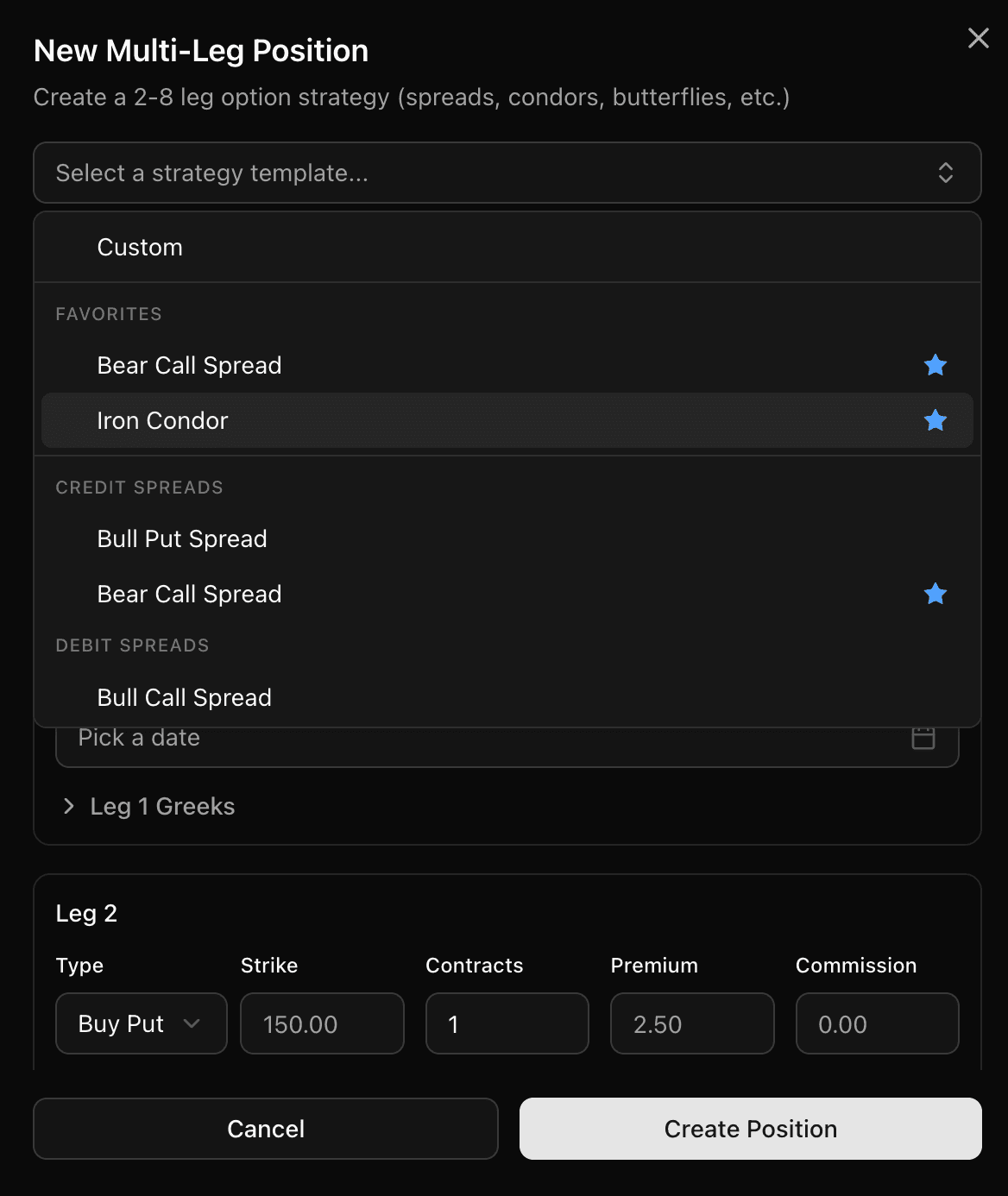
You can now save your go-to strategies as favorites. Star any template — iron condor, bear call spread, butterfly, or any other — and it moves to the top of the strategy picker. No more scrolling through the full list every time you open a new multi-leg position.

Open the New Multi-Leg Position dialog, click the strategy dropdown, and your favorites appear first. One click to select, and the form pre-fills with the right structure. Unfavorite just as easily if your playbook changes.

Strategy template dropdown with favorited strategies pinned to the top
Feature

Multi-Leg Strategy Intelligence

Strategy-aware multi-leg form with live detection and trade summary.

Multi-leg entries are now strategy-aware. Select a template — iron condor, butterfly, vertical spread, calendar, diagonal, or any other common structure — and the form links the fields that should stay in sync: expirations for spreads, strikes for straddles, contracts across all legs. Need to deviate? Override any linked field with a single click.

Live strategy detection identifies your position as you fill in the legs and keeps everything in sync automatically. A Trade Summary appears with Max Win, Max Loss, and Estimated Margin — calculated the same way your broker does, including commission impact.

Strategy descriptions and direction labels help you confirm you're building the right structure. Less time double-checking, more confidence when logging your trades.

Feature

Wheel Strategy — Full Cycle Tracking

Sells, assignments, covered calls, and called-away shares — all auditable.

The wheel strategy now tracks end-to-end — from selling puts through assignment to selling covered calls and shares being called away. Every step creates real, auditable records.

When a put is assigned, a stock BUY trade is created automatically with the correct cost basis. When shares are called away via a covered call, a SELL trade is created with lot allocations, realized P&L, and the position locks itself. The calendar, dashboard, recent trades, analysis — every screen shows the right numbers without manual entry.

Option P&L and stock P&L are now cleanly separated. Premium collected stays in your options bucket. Share appreciation or loss stays in your stocks bucket. No double-counting, no leaking between the two. Your ledger is the single source of truth — as it should be.

Feature

Ticker Report

Pivot the entire journal around a single symbol — stocks and options.

Your journal shows everything — now you can pivot around a single symbol. Pick any ticker and see statistics, individual trades, price ranges, and strategy breakdowns for both options and stocks.

For options: closed chains, strategy breakdown by win rate, average premium, hold time, and total P&L per strategy type. For stocks: total P&L, win rate, average hold time, largest win and loss, plus Buy and Sell Zones showing where your entries and exits concentrate.

Every number comes straight from the ledger — the same source of truth used across your journal, calendar, and dashboard. No separate formulas, no discrepancies.

Feature

Greeks & IV Tracking

Log Delta, Theta, Gamma, Vega, and IV at open and close.

You can now track Greeks and Implied Volatility on your option trades.

Log Delta, Theta, Gamma, Vega, and IV for each trade. Track values at both open and close to see how your positions evolved. All columns are sortable and can be shown or hidden via the new column visibility selector.

Whether you're monitoring time decay, volatility exposure, or directional risk — it's all in one place now.

Feature

Multi-Dimensional Trade Analysis

Price ranges, day-of-week, time-of-day, and overall metrics in one place.

Break down your trading performance across multiple dimensions — all in one place.

Price Range Analysis — see where your entries and exits cluster and spot the price zones where you perform best. Day of Week P&L — find which days are most profitable and which you should sit out. Time of Day Breakdown — discover your optimal trading window by hour. Overall Performance Metrics — win rate, average P&L, cumulative charts, your edge quantified.

Works for both options and stock trades. As always, completely free.

Launch

TickerScribe is Live 🎉

Free advanced trading journal for options and stock traders.

We're excited to launch TickerScribe — a free advanced trading journal for options and stock traders.

Track every trade with ledger-accurate P&L, rollover chains, daily results calendar, and a performance dashboard. Per-leg P&L, assignment tracking, and expiration management for options. Position grouping with FIFO, LIFO, and average cost basis for stocks.

We're already working on new features, and your feedback drives what comes next.

Start tracking your trades

No credit card required. Ledger-accurate P&L for options and stocks.