// ibkr import
Your IBKR Trading Journal
Journal your Interactive Brokers trades without re-typing a single one. Export the Transaction History statement from Client Portal, drop it in, and TickerScribe recognizes it on sight — options, stocks, and cash, mapped automatically.
Transaction History CSV in · recognized on sight · 100% free
// how-to-export
From Client Portal to your journal
Four steps, about two minutes.
- 01
Run the Transaction History statement
In IBKR Client Portal, open Performance & Reports → Statements and run the Transaction History statement.
- 02
Pick your date range, choose CSV
Select the period and CSV as the format. IBKR caps a statement at one year — for older history, run one file per year.
- 03
Drop the file into the Import Wizard
Settings → Import Data, drag the file in. TickerScribe recognizes the IBKR layout on sight — no column mapping, no file cleanup.
- 04
Preview & commit
See every trade before anything is saved. Duplicates are flagged and skipped, then trades post to the ledger — multi-leg positions grouped, strategies detected.
// auto-detected
The whole statement. Zero setup.
The drop step works because TickerScribe reads IBKR's statement exactly as Client Portal produces it — several sections bundled into one CSV, every row prefixed with a section name. Here's what happens to each line.
Statement,Data,Title,Transaction HistoryrecognizedSummary,Data,Base Currency,EURbase currencyTransaction History,Header,Date,Account,Description,Transaction Type,Symbol,…columns mappedTransaction History,Data,…,Sell,SAP,-12.0,224.15,EUR,…stock tradeTransaction History,Data,…,Sell,PLTR 261218C00045000,-1.0,…option · OCC parsedTransaction History,Data,…,Electronic Fund Transfer,Deposit,…cashTransaction History,Data,…,Forex Trade Component,EUR.USD,…FX leg · skippedThe Transaction History section is extracted automatically; everything else in the file is read for context or safely ignored.
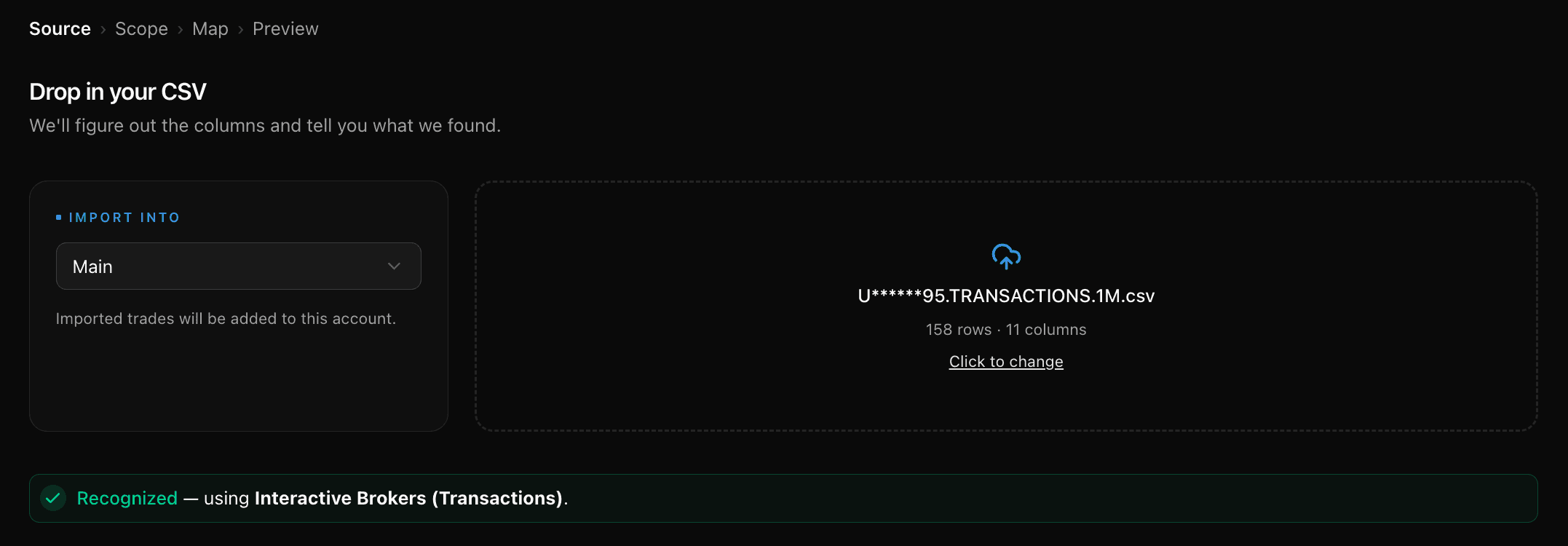
The moment it lands: recognized, mapped, ready to preview.
Stocks
Buys and sells with quantities, prices, and commissions — partial lots and short positions included.
Options
OCC symbols are parsed into underlying, strike, expiration, and call/put. Multi-leg detection groups spreads into single positions, and 30+ strategies are detected automatically.
Cash transactions
Deposits, withdrawals, dividends, credit interest, fees, and withholding taxes — so your portfolio value and deployed capital stay accurate.
Multi-currency accounts
IBKR reports amounts in your base currency but prices in each instrument's own currency. TickerScribe normalizes prices to the base currency using IBKR's own figures — no FX-rate lookups — and the per-trade conversion legs are filtered out instead of importing as bogus trades.
Safe re-imports
Every trade carries a content fingerprint. Re-running a file, or importing overlapping date ranges, flags duplicates on the preview step and skips them.
Using a Flex Query or a TWS export instead? Those aren't auto-detected, but they import through the universal CSV mapper — columns auto-suggested, confirmed once, remembered after.
Two minutes from Client Portal
Bring your IBKR history home
No credit card required. Export one statement, drop it in, and see your real numbers.
Frequently Asked Questions
Is TickerScribe really free?
Which IBKR file does TickerScribe auto-detect?
Transaction History or Activity Statement — which should I use?
Do IBKR options trades import correctly?
My IBKR account isn't in USD — will the amounts come across right?
Can I use a Flex Query or TWS export instead?
IBKR limits statements to one year — how do I import older history?
- thinkorswimThe Account Statement — spread legs reassembled, fees matched, expirations closed.
- SchwabBoth exports work — transaction history and per-holding lot details.
- FidelityOne Accounts History file — options, stocks, and cash, with option symbols decoded.
- RobinhoodThe activity report — options parsed from plain text, cash included.
- TradeStationThe trades report — compact option symbols decoded automatically.
- tastytradeThe transaction history — partial fills merged, quoted premiums restored, expirations closed.
- WebullThe order-history export — only filled orders, at their average fill price; unfilled orders set aside.
- AlpacaYour trade activity as a CSV — every fill and partial fill imported at the exact price it executed.
- WealthsimpleThe Activity export — stocks, options, and cash from one file, with per-contract premiums normalized.
- Trade RepublicThe Transaction export — savings-plan fractions, the whole cash ledger, splits netted and name changes followed.
- E*TRADEThe Transaction History CSV — options, stocks and cash, with the contract read from the description rather than the underlying.
- M1The Activity export — fractional notional orders priced from the cash they actually moved.
- Every other broker & journal — the universal CSV mapper
// keep exploring
Explore More Features
Options Journal
30+ strategies, rollover chains, Greeks & IV, per-leg P&L.
Stock Journal
Position grouping, cost basis methods, and one-click logging.
Short Selling
A sell that opens the position, a buy-to-cover that closes it, P&L the right way round.
Daily Journal
Notes, plan & reflection, mood, tags, and chart screenshots — per day.
Trade Notes
Notes, tags, and screenshots per trade — and a scoreboard of how each setup performs.
Performance Dashboard
KPIs, cumulative P&L chart, and portfolio overview.
P&L Calendar
Shareable daily P&L heatmap with drill-down.
Trade Analysis
Price ranges, day-of-week P&L, and time-of-day patterns.
Wheel Analysis
Puts, covered calls, and assignments — stitched into cycles with annualized return.