The best free Tradervue alternative for options traders.
Tradervue is the longest-running trading journal, and broker sync is genuinely convenient. But options journaling sits behind a subscription — with expirations and assignments entered by hand. TickerScribe does options properly, and it's 100% free, no card.
TickerScribe vs Tradervue
A full, feature-by-feature comparison — including where Tradervue comes out ahead. Tradervue details are from its own pricing and help pages.
| Feature | TickerScribe | Tradervue |
|---|---|---|
| Price | Free, no card | Free: 30 trades/mo, stocks only · paid from $29.95/mo |
| Stocks | ||
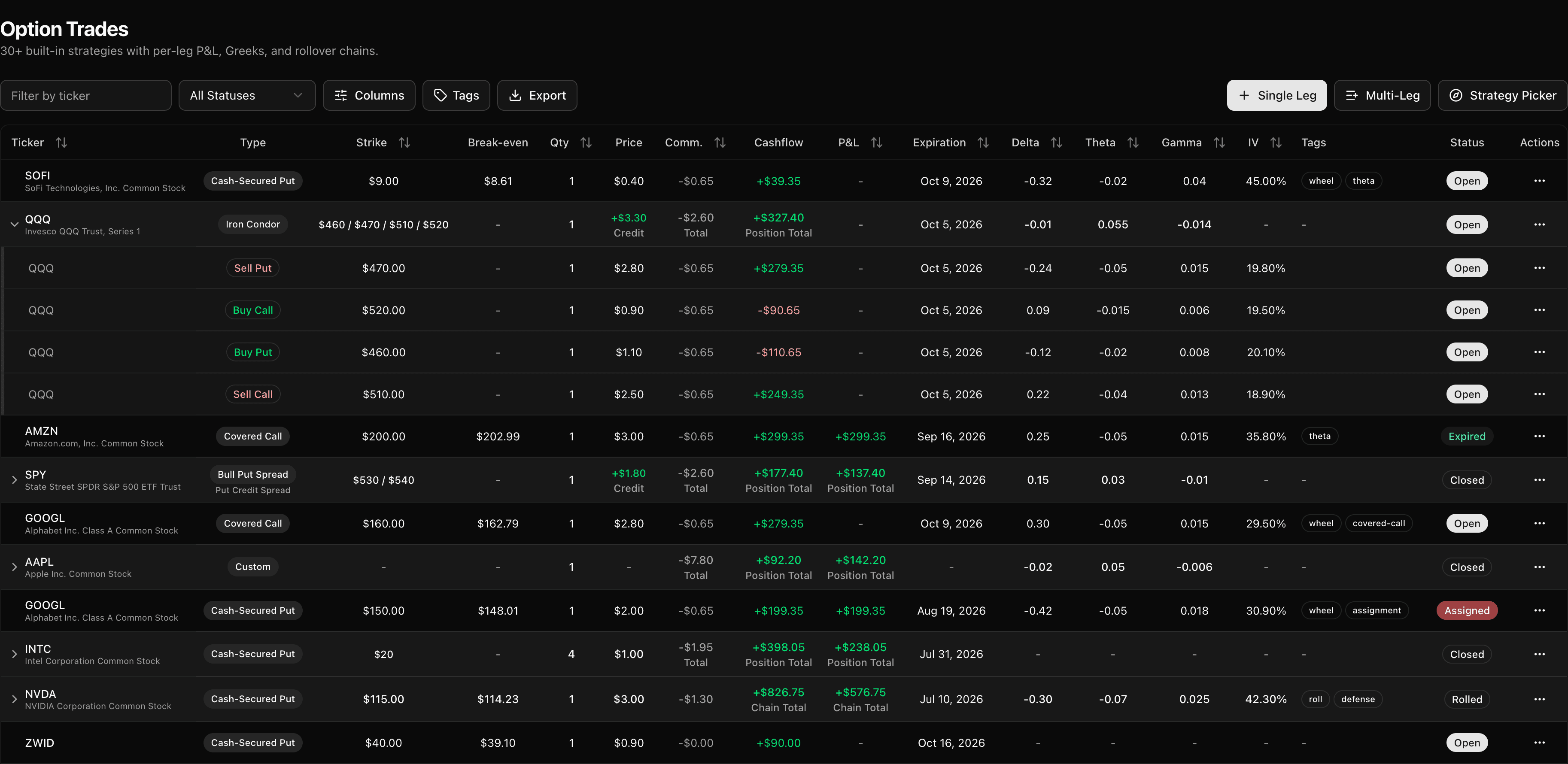
| Options | 30+ strategies (auto-detected) with payoff-diagram picker, single- & multi-leg, Greeks & IV at open/close, rollover chains, assignments & expirations, the wheel & covered calls, per-leg P&L — free | Paid plans only; expirations & assignments entered manually |
| Stocks + options as one position (the wheel: CSP → assignment → covered call) | Auto-linked across both | |
| Option Greeks & IV tracking | ||
| Futures & forex | On paid plans | |
| Broker auto-sync | Nightly, on paid plans | |
| Broker CSV import on the free plan | Unlimited — auto-detect + universal mapper, options included | 30 trades/mo, stocks only |
| P&L calendar | ||
| Shareable public link | Full P&L calendar, optional amount masking | Shared-trades feed (P&L hidden by default) |
| Trade analysis | Price range, day-of-week, time-of-day, hold time (down to minutes), DTE & portfolio beta | 100+ reports on Gold plan |
| Live market overview, built around your book | Market Today — today's sentiment, volatility & direction, live news on your tickers, and your live book P&L, all on one screen, every session | Synced positions, but no market read or news |
| Daily journal | Plan, notes & reflection, mood, tags & screenshots | Notes, tags & charts |
| Community & mentoring | Public trade feed; mentor access on paid plans | |
| Multiple accounts | Up to 3, free — plus an all-accounts overview | Unlimited on paid plans |
Tradervue's plans and limits as listed on its site in June 2026 — something look off? Tell us at support@tickerscribe.com and we'll fix it — we'd rather be accurate than flattering.
Which one is right for you?
Here's where each tool genuinely wins.
Choose TickerScribe
Options are where it pulls ahead — it's the better fit if you:
- Trade options seriously — 30+ auto-detected strategies, Greeks & IV at open and close, rollover chains, and native assignment & expiration handling, all free.
- Run the wheel across stocks and options — cash-secured puts, assignments, and covered calls link into one position, not scattered trades.
- Don't want a subscription — Tradervue's free plan caps at 30 trades a month and journals stocks only.
- Want to share your full P&L calendar — ad-free, with optional amount masking.
- Want penny-accurate, structured analytics — by ticker, day-of-week, time-of-day, and DTE.
- Want a live market read the moment you log in — today's sentiment, volatility and direction, news on the tickers you hold, and your live book P&L, all on one screen.
Choose Tradervue
We'd rather you pick the right tool. Tradervue is likely the better fit if you:
- Want nightly broker auto-sync instead of CSV imports — and don't mind paying for it.
- Trade futures or forex — TickerScribe focuses on stocks and options.
- Use the mentoring workflow or public trade-feed community.
- Want the deepest report library in the category (100+ on the Gold plan).
Bring your Tradervue history with you
Your trades aren't locked in. Export them as a CSV — or reuse your original broker files — and drop them into TickerScribe. No manual re-typing.
- 1
Export from Tradervue
Download your trades as a CSV — or grab the original broker exports you've been feeding Tradervue.
- 2
Drop it into TickerScribe
Tradervue's export maps through the universal mapper — TickerScribe auto-suggests every column, and remembers your choices.
- 3
Review and you're in
Each round-trip becomes a clean entry and exit. Skim the preview, confirm, and your history is live.
TickerScribe doesn't auto-detect the Tradervue export format yet, so it goes through the universal mapper — every column gets an auto-suggested match, and your mapping is remembered for next time. Broker exports from major brokers are recognized automatically.
Import your trades and see the difference
Free, no card. Bring your history in and start tracking in under a minute.
Frequently Asked Questions
Is TickerScribe a free alternative to Tradervue?
Can I import my Tradervue history?
Does TickerScribe have broker auto-sync like Tradervue?
How is options journaling different between the two?
Does TickerScribe support futures or forex?
Is TickerScribe really better than Tradervue?
- vs StonkJournalBoth free — TickerScribe adds broker import, deep options, and a shareable calendar.
- vs TraderSyncMulti-asset powerhouse with auto-sync and AI — at a subscription, with no free plan.
- vs TradeZellaBacktesting, AI, and community — behind a subscription with no free tier or trial.
- vs EdgewonkPsychology-first journal for forex & futures; options are logged as generic trades.
- vs TradesVizThe analytics powerhouse — 600+ stats; options journaling lives in the paid tiers.
- vs SpreadsheetsTotal flexibility vs zero formula maintenance — where each one genuinely wins.
- All comparisons