The best free StonkJournal alternative for options traders.
StonkJournal is a great free journal. But if you trade options seriously or import from a broker, TickerScribe does more — and it's still 100% free, no card.
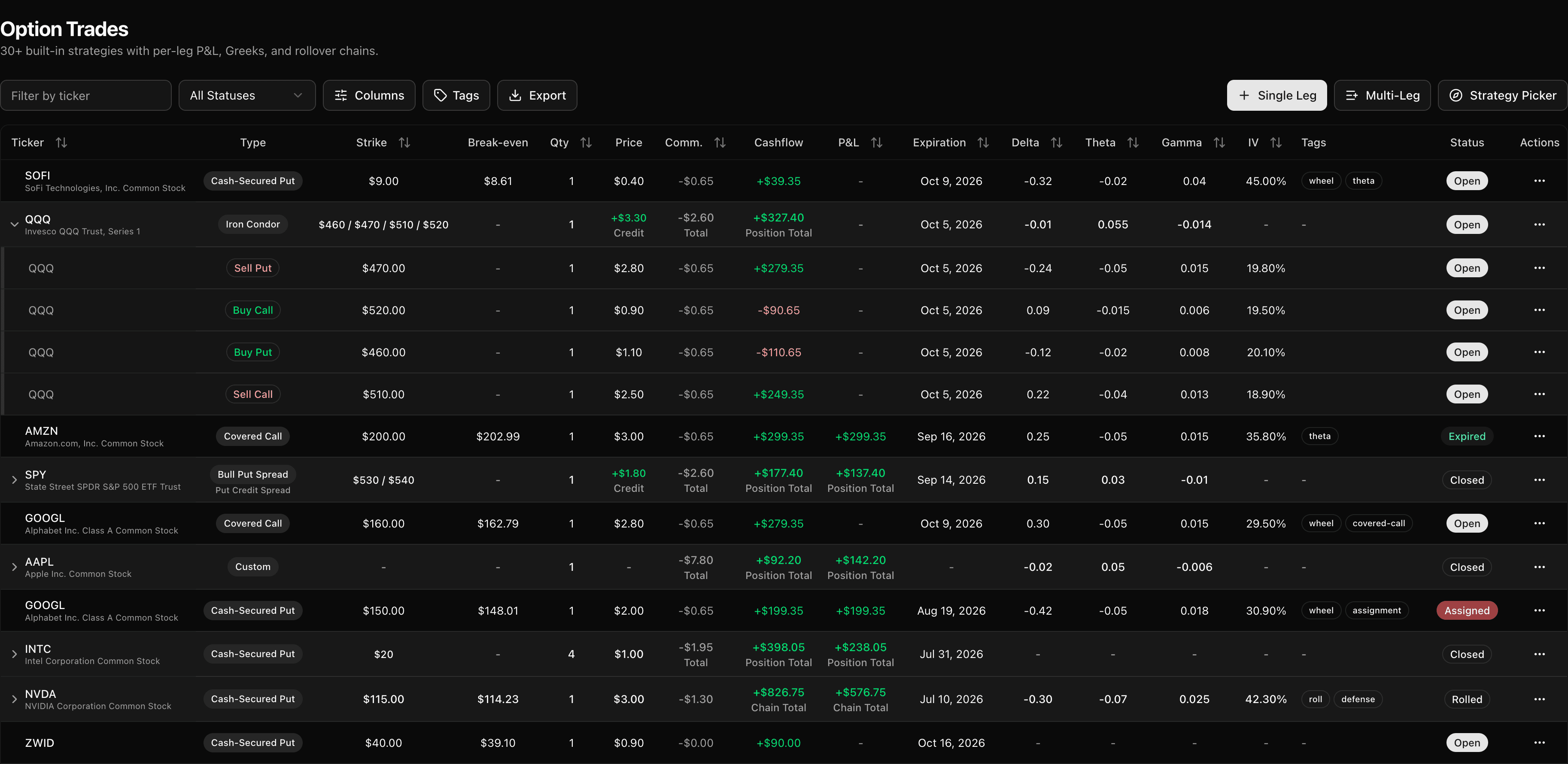
TickerScribe vs StonkJournal
A full, feature-by-feature comparison — including where StonkJournal comes out ahead.
| Feature | TickerScribe | StonkJournal |
|---|---|---|
| Price | Free, no card | Free, no card · Pro $10/mo for CSV import, the AI coach & all-accounts roll-up |
| Stocks | ||
| Options | 30+ strategies (auto-detected) with payoff-diagram picker, single- & multi-leg, Greeks & IV at open/close, rollover chains, assignments & expirations, the wheel & covered calls, per-leg P&L | Multi-leg spreads auto-detected; no roll chains or Greeks documented |
| Stocks + options as one position (the wheel: CSP → assignment → covered call) | Auto-linked across both, with Wheel Analysis cycles | Separate, manual |
| Futures, crypto & forex | ||
| Broker CSV import | Free — auto-detect + universal mapper | Pro plan only, with column mapping |
| CSV export | ||
| P&L calendar | ||
| Trade analysis | Buy/sell zones, day-of-week, time-of-day, hold time, DTE & delta at entry, expectancy, profit factor, streaks & max drawdown | 30+ metrics — time-of-day, day-of-week, drawdown, rule compliance & behavioral patterns |
| Performance dashboard | Period ROC on the capital actually working, a benchmark you choose, deployed capital, portfolio beta, expiring options & cash activity | Core stats, P&L, balances & equity curve |
| Performance by ticker | Win rate, buy/sell zones & strategy breakdown | Stats by symbol |
| Risk rules & compliance scoring | Stop and target on stock trades, R:R and result in R in the trade log | 10 rule types — max risk, position size, daily loss, R:R — scored on every trade |
| AI coach | On Pro — reads your journal, flags costly patterns, logs trades from chat | |
| Live market overview, built around your book | Market Today — today's sentiment, volatility & direction, live news on your tickers, and your live book P&L, all on one screen, every session | |
| Cash tracking (deposits & withdrawals) | ||
| Multiple accounts | Up to 3, free — plus an all-accounts overview | Unlimited; all-accounts roll-up on Pro |
| Multi-currency | ||
| Shareable public link | Full P&L calendar | Last 100 trades |
| Hide amounts when sharing | ||
| Daily journal | State, plan & checklist; mood & reflection; tags, screenshots & P&L patterns | Tags, confidence, screenshots |
| Support chat | In-app chat |
StonkJournal's plans and features as listed on its site in October 2026 — something look off? Tell us at support@tickerscribe.com and we'll fix it — we'd rather be accurate than flattering.
Which one is right for you?
Here's where each tool genuinely wins.
Choose TickerScribe
Options are where it pulls ahead — it's the better fit if you:
- Run the wheel across stocks and options — cash-secured puts, assignments, and covered calls link into one position, not scattered trades.
- Trade options seriously — 30+ auto-detected strategies with a payoff-diagram picker, single- & multi-leg, Greeks & IV at open and close, and per-leg P&L.
- Want to import from a broker or another journal without a paid plan — no manual re-entry.
- Want to share your full P&L calendar — not just your last 100 trades — with optional amount masking.
- Want penny-accurate, structured analytics — by ticker, day-of-week, time-of-day, and DTE.
- Want a live market read the moment you log in — today's sentiment, volatility and direction, news on the tickers you hold, and your live book P&L, all on one screen.
Choose StonkJournal
We'd rather you pick the right tool. StonkJournal is likely the better fit if you:
- Trade futures, crypto, or forex — TickerScribe focuses on stocks and options.
- Want rule-based risk checks — max risk, position size, daily loss, and R:R limits scored on every trade.
- Want an AI coach that reads your journal and calls out costly patterns — and don't mind paying for Pro to get it.
- Want the largest, most battle-tested community behind your journal.
Bring your StonkJournal history with you
Your trades aren't locked in. Export them as a CSV, drop the file into TickerScribe, and we take it from there — about a minute, no manual re-typing.
- 1
Export from StonkJournal
Download your trades as a CSV — the standard StonkJournal export, exactly as it comes.
- 2
Drop it into TickerScribe
Upload the file. We recognize the StonkJournal format on sight — no column mapping, no setup screen.
- 3
Review and you're in
Each round-trip becomes a clean entry and exit. Skim the preview, confirm, and your history is live.
StonkJournal's export is light on options — it leaves out strike and expiration — so those come in best-effort, with every estimated field flagged right on the trade. Stock trades come over complete.
Import your trades and see the difference
Free, no card. Bring your history in and start tracking in under a minute.
Frequently Asked Questions
Is TickerScribe free like StonkJournal?
Can I import my trades from StonkJournal?
Does TickerScribe support futures, crypto, or forex?
Is TickerScribe really better than StonkJournal?
- vs TradervueThe longest-running journal; options sit behind a paid plan, with manual bookkeeping.
- vs TraderSyncMulti-asset powerhouse with auto-sync and AI — at a subscription, with no free plan.
- vs TradeZellaBacktesting, AI, and community — behind a subscription with no free tier or trial.
- vs EdgewonkPsychology-first journal for forex & futures; options are logged as generic trades.
- vs TradesVizThe analytics powerhouse — 600+ stats; options journaling lives in the paid tiers.
- vs SpreadsheetsTotal flexibility vs zero formula maintenance — where each one genuinely wins.
- All comparisons